Forum Discussion

Cumulative Sum of Each Column or Row
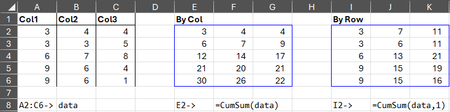
- Jan 20, 2026
While I can't speak on the technical aspects of the concept of lazy evaluation, I do feel there is a time and place for it (and this doesn't appear to be one of those times). In a recent discussion, The Diagonal Suite: Gentle thunking goes a long way!, it was suggested that using thunks to delay eager evaluation whenever possible in generalized Lambda development will always result in quicker calculation times. However, a simple Timer test shows this to not always be the case.
When testing your function as written with a large array, SEQUENCE(1000000,10), the results on my system were 3,500ms by_col and 3,000ms by_row on average (tested multiple times). I then modified the function definition by removing all 4 instances of LAMBDA(...)() and the average calculation times dropped to 2,500ms by_col and 2,000ms by_row. The formula I used to conduct the test was:
=Timer(A1,LAMBDA(x,CumSum(SEQUENCE(1000000,10),x)))...where A1 was a checkbox to toggle the by_row argument on and off.
Aside from that, it's also possible to simplify the function definition by modifying the sub-function with additional parameters to swap ROWS with COLUMNS and VSTACK with HSTACK (as well as the rows and [columns] arguments of TAKE and DROP), which will eliminate having to check IF(by_row,...) twice:
= LAMBDA(array,[by_row],
    LET(
        fn, LAMBDA(a,f₁,f₂,i,[j],IF(f₁(a)=1,a,a-f₂(0,DROP(TAKE(a,i,j),j,i)))),
        IF(
            by_row,
            fn(SCAN(0,array,SUM),ROWS,VSTACK,,-1),
            fn(TRANSPOSE(SCAN(0,TRANSPOSE(array),SUM)),COLUMNS,HSTACK,-1)
        )
    )
)
Furthermore, the check for a single row or column can also be eliminated by rearranging the order of VSTACK/HSTACK and DROP (stack first to prevent DROP from erroring):
=LAMBDA(array,[by_row],
    LET(
        fn, LAMBDA(a,fx,i,[j],a-DROP(fx(0,TAKE(a,i,j)),j,i)),
        IF(
            by_row,
            fn(SCAN(0,array,SUM),VSTACK,,-1),
            fn(TRANSPOSE(SCAN(0,TRANSPOSE(array),SUM)),HSTACK,-1)
        )
    )
)
This also shaved an additional 200ms off the average calculation times in my tests.
These are just my humble observations/suggestions. Your function is already very efficient as is. ;)
Kind regards.

While I can't speak on the technical aspects of the concept of lazy evaluation, I do feel there is a time and place for it (and this doesn't appear to be one of those times). In a recent discussion, The Diagonal Suite: Gentle thunking goes a long way!, it was suggested that using thunks to delay eager evaluation whenever possible in generalized Lambda development will always result in quicker calculation times. However, a simple Timer test shows this to not always be the case.
When testing your function as written with a large array, SEQUENCE(1000000,10), the results on my system were 3,500ms by_col and 3,000ms by_row on average (tested multiple times). I then modified the function definition by removing all 4 instances of LAMBDA(...)() and the average calculation times dropped to 2,500ms by_col and 2,000ms by_row. The formula I used to conduct the test was:
=Timer(A1,LAMBDA(x,CumSum(SEQUENCE(1000000,10),x)))...where A1 was a checkbox to toggle the by_row argument on and off.
Aside from that, it's also possible to simplify the function definition by modifying the sub-function with additional parameters to swap ROWS with COLUMNS and VSTACK with HSTACK (as well as the rows and [columns] arguments of TAKE and DROP), which will eliminate having to check IF(by_row,...) twice:
= LAMBDA(array,[by_row],
    LET(
        fn, LAMBDA(a,f₁,f₂,i,[j],IF(f₁(a)=1,a,a-f₂(0,DROP(TAKE(a,i,j),j,i)))),
        IF(
            by_row,
            fn(SCAN(0,array,SUM),ROWS,VSTACK,,-1),
            fn(TRANSPOSE(SCAN(0,TRANSPOSE(array),SUM)),COLUMNS,HSTACK,-1)
        )
    )
)
Furthermore, the check for a single row or column can also be eliminated by rearranging the order of VSTACK/HSTACK and DROP (stack first to prevent DROP from erroring):
=LAMBDA(array,[by_row],
    LET(
        fn, LAMBDA(a,fx,i,[j],a-DROP(fx(0,TAKE(a,i,j)),j,i)),
        IF(
            by_row,
            fn(SCAN(0,array,SUM),VSTACK,,-1),
            fn(TRANSPOSE(SCAN(0,TRANSPOSE(array),SUM)),HSTACK,-1)
        )
    )
)
This also shaved an additional 200ms off the average calculation times in my tests.
These are just my humble observations/suggestions. Your function is already very efficient as is. ;)
Kind regards.

Re: Gentle thunking
Delaying eager evaluation of indices is often advantageous because it gives you back the calculation cost of caching calculations with LET. An example of this is the Ulam spiral:
Thunking the result of Lambda helpers such as BYROW/BYCOL, MAP, REDUCE, etc. usually has no benefit or slows calculations. Additionally, delaying eager evaluation of stacking functions is usually not a good idea!
I pick and choose my spots for using thunks and thoroughly time no thunks vs. thunks before finalizing a function.
- djclementsJan 21, 2026Silver Contributor
Good to know! Your Spiralλ function is definitely proof of concept... I tested it as written, with all calculations delayed until delivery vs having all variables evaluated as they are encountered, and it was notably faster, which is surprising to say the least, considering the sheer number of times both x() and y() are being re-evaluated (which in turn causes j() and i() to also re-evaluate).
A simple test to prove delayed calculations are re-evaluated each time they are called is:
=LET(f,LAMBDA(RAND()),VSTACK(f(),f()))which returns 2 different random numbers vs:
=LET(f,LAMBDA(x,LAMBDA(x))(RAND()),VSTACK(f(),f()))which returns 2 identical random numbers.
In the limited research I did on this topic, I read that with eager evaluation, resources are consumed up front (memory and CPU time), which can be resource-intensive if the results are not needed. This is the confusing part, because every variable in your Spiralλ function is needed and used (with the exception of d_). The underlying reasoning for the performance boost is beyond my understanding, lol. Good on you for discovering this method! ;)
- Patrick2788Jan 21, 2026Silver Contributor
This is an interesting case of eager evaluation which I won't call an anomaly because Excel errs on the side of eager evaluation most times. I share it because I haven't seen this mentioned any place. GroupbyDateλ is essentially GROUPBY with the ability to handle date/time aggregations.
The error checking is front-loaded with Validateλ and designed to halt the function before it can even get into the LET block. The idea is if there's an error to fail quickly. The odd thing is the function should have terminated before the downstream calculations could even error. Thunking the entire LET block suppressed this quirk.
Very difficult to reproduce this setup (Even through process of eliminating variables and stripping it down to bare bones). My thought is that Excel prioritizes determining spill size and will attempt to do this even if the function is set to terminate with an IF, for example, before the arrays are calculated.
This is the short version (the actual function is very lengthy) which gives an idea of the arrangement:
GroupbyDateλ= LAMBDA( row_fields,values,interval,function,[format],[field_headers],[filter_array], //Validate inputs Validateλ(row_fields,values,interval,function,field_headers,filter_array, //Defer entire block to prevent eager evaluation. Intervals 1 (minutes) and 2 (hours) //will revert quickly to #VALUE! if supplied row_fields does not include time. LAMBDA( LET( .... )))());- djclementsJan 21, 2026Silver Contributor
I thought about this some more, but it still makes no sense to me how re-evaluating the same delayed calculations multiple times could possibly be faster than defining a variable once and reusing its results multiple times. After all, one of the supposed key benefits of LET is to improve performance by evaluating an expression once.
I wondered if the performance boost we're seeing can be attributed solely to the benefits of LAMBDA, or if it's also an apparent flaw in the efficiency of LET, so I rewrote your Spiralλ function without LET or LAMBDA, repeating every instance of SEQUENCE (all of the i(), j(), x() and y() variables) within the nested IF statements:
= LAMBDA(rings,[start_at],
    IF(ISOMITTED(start_at),1,start_at)+
    IF(
        (ABS((SEQUENCE(,rings*2+1,-rings,1)*SEQUENCE(rings*2+1,,1,0)))>ABS((SEQUENCE(rings*2+1,,rings,-1)*SEQUENCE(,rings*2+1,1,0))))*((SEQUENCE(,rings*2+1,-rings,1)*SEQUENCE(rings*2+1,,1,0))>0),
        4*(SEQUENCE(,rings*2+1,-rings,1)*SEQUENCE(rings*2+1,,1,0))^2-3*(SEQUENCE(,rings*2+1,-rings,1)*SEQUENCE(rings*2+1,,1,0))+(SEQUENCE(rings*2+1,,rings,-1)*SEQUENCE(,rings*2+1,1,0)),
        IF(
            (ABS((SEQUENCE(,rings*2+1,-rings,1)*SEQUENCE(rings*2+1,,1,0)))>ABS((SEQUENCE(rings*2+1,,rings,-1)*SEQUENCE(,rings*2+1,1,0))))*((SEQUENCE(,rings*2+1,-rings,1)*SEQUENCE(rings*2+1,,1,0))<=0),
            4*(SEQUENCE(,rings*2+1,-rings,1)*SEQUENCE(rings*2+1,,1,0))^2-(SEQUENCE(,rings*2+1,-rings,1)*SEQUENCE(rings*2+1,,1,0))-(SEQUENCE(rings*2+1,,rings,-1)*SEQUENCE(,rings*2+1,1,0)),
            IF(
                (ABS((SEQUENCE(,rings*2+1,-rings,1)*SEQUENCE(rings*2+1,,1,0)))<=ABS((SEQUENCE(rings*2+1,,rings,-1)*SEQUENCE(,rings*2+1,1,0))))*((SEQUENCE(rings*2+1,,rings,-1)*SEQUENCE(,rings*2+1,1,0))>0),
                4*(SEQUENCE(rings*2+1,,rings,-1)*SEQUENCE(,rings*2+1,1,0))^2-(SEQUENCE(rings*2+1,,rings,-1)*SEQUENCE(,rings*2+1,1,0))-(SEQUENCE(,rings*2+1,-rings,1)*SEQUENCE(rings*2+1,,1,0)),
                4*(SEQUENCE(rings*2+1,,rings,-1)*SEQUENCE(,rings*2+1,1,0))^2-3*(SEQUENCE(rings*2+1,,rings,-1)*SEQUENCE(,rings*2+1,1,0))+(SEQUENCE(,rings*2+1,-rings,1)*SEQUENCE(rings*2+1,,1,0))
            )
        )
    )
)
The results were mindboggling, as it was just as efficient as your lazy evaluation version (both of which are notably faster than defining each variable once in a standard LET statement). This absolutely flies in the face of conventional logic and completely contradicts LET's claim to fame. I am shocked. 😮