Forum Discussion

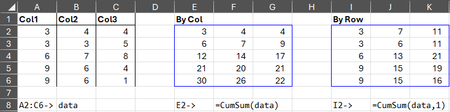
Cumulative Sum of Each Column or Row
- Jan 20, 2026
While I can't speak on the technical aspects of the concept of lazy evaluation, I do feel there is a time and place for it (and this doesn't appear to be one of those times). In a recent discussion, The Diagonal Suite: Gentle thunking goes a long way!, it was suggested that using thunks to delay eager evaluation whenever possible in generalized Lambda development will always result in quicker calculation times. However, a simple Timer test shows this to not always be the case.
When testing your function as written with a large array, SEQUENCE(1000000,10), the results on my system were 3,500ms by_col and 3,000ms by_row on average (tested multiple times). I then modified the function definition by removing all 4 instances of LAMBDA(...)() and the average calculation times dropped to 2,500ms by_col and 2,000ms by_row. The formula I used to conduct the test was:
=Timer(A1,LAMBDA(x,CumSum(SEQUENCE(1000000,10),x)))...where A1 was a checkbox to toggle the by_row argument on and off.
Aside from that, it's also possible to simplify the function definition by modifying the sub-function with additional parameters to swap ROWS with COLUMNS and VSTACK with HSTACK (as well as the rows and [columns] arguments of TAKE and DROP), which will eliminate having to check IF(by_row,...) twice:
= LAMBDA(array,[by_row],
    LET(
        fn, LAMBDA(a,f₁,f₂,i,[j],IF(f₁(a)=1,a,a-f₂(0,DROP(TAKE(a,i,j),j,i)))),
        IF(
            by_row,
            fn(SCAN(0,array,SUM),ROWS,VSTACK,,-1),
            fn(TRANSPOSE(SCAN(0,TRANSPOSE(array),SUM)),COLUMNS,HSTACK,-1)
        )
    )
)
Furthermore, the check for a single row or column can also be eliminated by rearranging the order of VSTACK/HSTACK and DROP (stack first to prevent DROP from erroring):
=LAMBDA(array,[by_row],
    LET(
        fn, LAMBDA(a,fx,i,[j],a-DROP(fx(0,TAKE(a,i,j)),j,i)),
        IF(
            by_row,
            fn(SCAN(0,array,SUM),VSTACK,,-1),
            fn(TRANSPOSE(SCAN(0,TRANSPOSE(array),SUM)),HSTACK,-1)
        )
    )
)
This also shaved an additional 200ms off the average calculation times in my tests.
These are just my humble observations/suggestions. Your function is already very efficient as is. ;)
Kind regards.


My goal is maximum efficiency.
I have no comments regarding your code (I don't want to dig into that tonight), but want to make you aware of how you can determine calculation performance yourself in Excel for Windows. High-precision timing can be done using VBA macros and other procedures. (And those procedures can be placed in your Personal.xlsb file, so the workbook you are measuring performance in does not need to be macro-enabled.) See Excel performance - Improving calculation performance , specifically, the "Measuring calculation time" section. But also read Speed of Functions vs. other Functions vs. VBA Macro