Forum Discussion

Creating Dynamic Dax measure for a virtual table to filter table instead of calculated table(static)
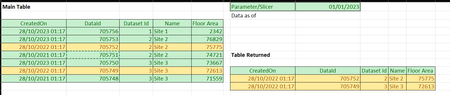
- Nov 30, 2023
In the sample CreatedOn is returned as text, thus I added Createddate column as DATEVALUE() from it
Bar date is added as measure
Depends on your actual model, you may take it as SELECTEDVALUE() on Date table, whatever.
Filtered table is calculated as
Filtered Table =
VAR belowDate =
    FILTER ( Main, Main[CreatedDate] < [pDate] )
VAR setRowId =
    ADDCOLUMNS (
        Main,
        "Id",
            ROWNUMBER (
                belowdate,
                ORDERBY ( Main[DataId], DESC ),
                PARTITIONBY ( Main[Dataset Id] )
            )
    )
VAR firstRows =
    FILTER ( setRowId, [Id] = 1 )
VAR result =
    SELECTCOLUMNS (
        firstRows,
        "CreatedDate", Main[CreatedDate],
        "DataId", Main[DataId],
        "Dataset Id", Main[Dataset Id],
        "Name", Main[Name],
        "Floor Area", Main[Floor Area]
    )
RETURN
    result
Resulting table is
You may return firstRows variables if don't care about extra Id column.

In the sample CreatedOn is returned as text, thus I added Createddate column as DATEVALUE() from it
Bar date is added as measure
Depends on your actual model, you may take it as SELECTEDVALUE() on Date table, whatever.
Filtered table is calculated as
Filtered Table =
VAR belowDate =
    FILTER ( Main, Main[CreatedDate] < [pDate] )
VAR setRowId =
    ADDCOLUMNS (
        Main,
        "Id",
            ROWNUMBER (
                belowdate,
                ORDERBY ( Main[DataId], DESC ),
                PARTITIONBY ( Main[Dataset Id] )
            )
    )
VAR firstRows =
    FILTER ( setRowId, [Id] = 1 )
VAR result =
    SELECTCOLUMNS (
        firstRows,
        "CreatedDate", Main[CreatedDate],
        "DataId", Main[DataId],
        "Dataset Id", Main[Dataset Id],
        "Name", Main[Name],
        "Floor Area", Main[Floor Area]
    )
RETURN
    result
Resulting table is
You may return firstRows variables if don't care about extra Id column.
 Excellove15Dec 08, 2023Iron Contributor
Hi SergeiBaklan
Thanks for your prompt response!
I have got the solution for this and thanks for your patience

Your solution was the backbone of what i have found! many thanks!
I will accept your solution as the best response and close this query
Please let me know if i can do anything for you!
Thanks!
- Excellove15Dec 01, 2023Iron Contributor
Hi SergeiBaklan ,
Many thanks for your quick reply sir !
This works like a gem!
only thing i expect is, can we convert this as a measure that doesn't return a physical table. Because when we use a calculated table in a report, it causes performance issues. So when I copy this calculated table measure and create a new measure and paste this measure to create a new measure, i am getting below error
So i created a dax measure as below to achieve the same in my sample file:
Measure 6 = calculate(max('cumulus_licensee estatemanagement_contacts'[CreatedOn]),FILTER('cumulus_licensee estatemanagement_contacts',
'cumulus_licensee estatemanagement_contacts'[CreatedOn] <= SELECTEDVALUE('Calendar'[Date])))My expected output would be a visual as below, it should filter the entire visual for the max date when we drag that measure either into visual or filter pane. For example, in this case max date is '9/16/2021 11:59:07 PM', but instead it gives all found date for corresponding EMSQL_ARNOLDCLARK-101. we only need max date.
Could you please help us to resolve this either a new measure or modify the above measure?
we only need a dax measure instead of calculated table measure that returns a physical table.
PFA sample file in below link
https://1drv.ms/u/s!AhUFhM5jR1jqjwkkzAYPIsa2oj1O?e=sydrnP
Thanks in advance!
- Excellove15Dec 07, 2023Iron Contributor
Hi SergeiBaklan ,
I have somehow found out the solution(Dax measure) as below:
Measure 2 =CALCULATE (MAX ( 'cumulus_licensee estatemanagement_contacts'[CreatedOn] ),FILTER (ALLSELECTED ( 'cumulus_licensee estatemanagement_contacts' ),'cumulus_licensee estatemanagement_contacts'[CreatedOn]<= SELECTEDVALUE ( 'Calendar'[Date] )))output:But when I drag in Name column from 'cumulus_licensee estatemanagement_contacts' table into the visual, the records split into two rows because there are multiple(in this case 2) records for Name column for that particular DBName_id.
My expected output would be like the below:
Also, I am trying to find the count of DBName_id for the above conditions(selected columns,filter conditions),
Below is the dax measure i tried for it:
Count =
COUNTROWS (
FILTER (
SUMMARIZE (
'cumulus_licensee estatemanagement_contacts',
'cumulus_licensee estatemanagement_contacts'[DBName_id]
),
[Measure 2] > 0
))
For some reason it's not working correctly.
I am also trying to find count of distinct DBName-Point_id from the cumulus_licensee estatemanagement_points table
Please help me to resolve this issue
PFA file here https://1drv.ms/u/s!AhUFhM5jR1jqjxVpTAePakWjsfpK?e=tadsxs
Thanks in advance!