Forum Discussion

Creating an automatic fee calculator based on formulas
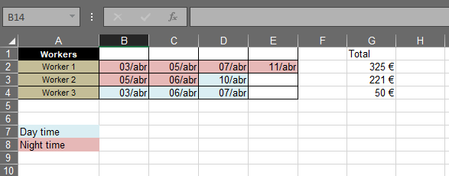

You are describing a situation with multiple moving parts here. It would be good to break them apart and deal with them in sequence rather than trying verbally to describe the whole mess.
Let me suggest you start with the varying pay tables, Tables 1 and 2, day and night, and make that into a single table. And don't use color to differentiate; use a code of some kind. The color can be derived from the code, but Excel is far more facile at reading and interpreting codes--and then applying color--than it is at going in reverse...seeing color and knowing what it means. For you as a human, presuming you're not color blind, there's no difference....but we're asking Excel to do the work.
So that single table would look something like this:
| Situation | DayNight | Rate |
| 1 | D | 20 |
| 1 | N | 35 |
| 2 | D | 15 |
| 2 | N | 30 |
I'm going to leave that for now and ask that you confirm that this makes sense.
Second, though, what do the entries in the red and blue cells mean? 03/abr etc. What does the "abr" refer to? Are there other codes that could appear?
In general, it's not a good idea to mix numeric and alpha characters in a single cell, especially if (as I think is the case) you're expecting mathematical calculations to be made based on the numbers. So if these are simply codes, that's fine, but if that means "3 hours ...." and the hours are going to be multiplied by the appropriate rate, then you'll need to find a different way to register that.
Let's leave aside for the moment the sequence of casting workers and just try to figure out how this pay process is toadministered.
 Gonsa17Apr 08, 2022Copper ContributorWell I might've got ahead of myself. Sorry!
First, the table makes sense. We have 4 different outcomes so to speak.
Second, "abr" is short for "ABRIL" which is APRIL in portuguese, so I want to fill in the cells with the day they are cast for the work for personal management. So I only move to the next cell (from C2 to D2 when C2 is filled with a date, in this example) when the previous one has a date on it.- mathetesApr 08, 2022Gold Contributor
First, the table makes sense. We have 4 different outcomes so to speak.
Glad to hear that.
But I think the next part, where you enter the specifics about each of three workers, needs some clarification.
- Although you use color to differentiate between day and night, you don't give any indication in that part of your first sheet as to which of the two scales (each of which has its own day and night rate) is applicable. So I've created a different way to display the assignments, and strongly recommend that instead of using 03/abr to designate the 3rd of April, you use 4/3/22 (or 3/4/22, whichever is your country's normal way of displaying dates. That will enable easy data manipulation when we get to that stage of calculating pay for a given period.
- Second, it's not at all clear how you get from Worker 1's first four periods of night time work to the pay of 325 Euros. What was the mathematical calc there? Neither the 35Euro rate nor the 30Euro rate relates directly to 325....so there must be another unmentioned variable buried there--perhaps an hourly rate.
So I've created a working spreadsheet for you....please fill in the two columns as requested (or explain why something else is needed). I'm hoping you can post it back in this thread; if not, we may need to use OneDrive or GoogleDrive or SharePoint for you to post the revised file.
- Gonsa17Apr 08, 2022Copper Contributor
1. Oh I see, I see.
2. The total was made up. I just needed to demonstrate how i needed the table to be done. So I'll update the spreadsheet you gave me and explain it more thoroughly. But the hours don't really matter. We always get paid for 4 hour shifts, even if the work is done in 2 hours. If you do 2 shifts you get ahead of other workers for that amount.
And unfortunately I cannot share the excel document, so here is the link for the google drive doc:
https://docs.google.com/spreadsheets/d/15r_aoR8LadWILbPDL8xFnQUtYPU4ZUzk/edit?usp=sharing&ouid=104424707493914611539&rtpof=true&sd=true