Forum Discussion

Creating a VLOOKUP Formula
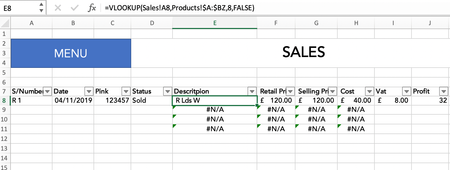

Try this one in M8 on your second sheet:
=IF(VLOOKUP(A8,Sheet1!A:J,4,FALSE)="Returned",VLOOKUP(A8,Sheet1!A:J,2,FALSE),"")
Replace "Sheet1" by the actual name of your first sheet.
 Gigi-rNov 05, 2019Copper Contributor
Thank you for your reply. It works which has really helped me.
However, if the item being sold e.g: R1 has been written twice into Sheet 1 "Sales" as it has sold first and then it has been returned. The formula will not show the return date in Sheet 2 "Products".
It only shows the return date if it has not been sold first.
For example in the images I have taken: In Sheet 1 "Sales" - R3 has been refunded without being sold and Sheet 2"Products" shows this return date. But the item R1 (in Sheet 1"Sales") that has been sold first and then returned after does not want to show this return date in Sheet 2"Products".
- Riny_van_EekelenNov 05, 2019Platinum Contributor
As @Patrick2788 already mentioned in his earlier response (and I omitted to do so), VLOOKUP doesn't work when you have duplicates. You need to find a way to make your items unique. E.g. by combining S/Number and Pink, as it seems that "Pink" is the receipt number for either a sale or a refund. For example R1_123457 is then not the same as R1_156789 and you can trace the selling- or the return date of that particular transaction.