Forum Discussion

Create worksheet from data in another worksheet with lots of conditional or if...then ???? HELPT
.png)
 Nov 23, 2018
Hello,
Please check the attached file. I have created formulas for "Bob". You can create similar ones for other people.
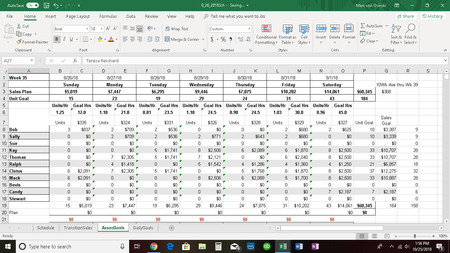
if your source page is same you can use "MATCH", "INDEX"/"OFFSET" formulas to get data. For example in your pictures the dates are in the first row. You can find the that days column with below formula:
=MATCH(TODAY,SheetName!$1:$1,0)
this will return the column number of the date for example 2 for "8/26/18). you need to add 1 if you want to get the Goal/Hrs.
then you need to find the related person:
=MATCH(PersonName,SheetName!$A:$A,0)
this will return 8 for bob
then you need to use and index or offset formula to get the required data
=OFFSET(SheetName!$A$1, MATCH(PersonName,SheetName!$A:$A,0)-1, MATCH(TODAY,SheetName!$1:$1,0)-1,1,1)
or
=INDEX(SheetName!$A$1:$R$20, MATCH(PersonName,SheetName!$A:$A,0), MATCH(TODAY,SheetName!$1:$1,0))
needless to say you need to replace generic names like SheetName and PersonName with the actual value you have.
 Marc von OsinskiNov 20, 2018Tin Contributor
Erol,
I'm sorry but I'm a little new to this kind of thing in excel. I don't really understand how all that works. So in the second sheet I already have the day, date, plan, etc, referencing the correct cell on the first sheet for each day because that is fairly static. Will what you told me to do start at the top under "Sunday" and look for the first person listed under that day, list their name, unit goal, and dollar goal. Then search again starting after that person and going down until they find the next person working etc until it finds them all? It may not be possible but I'm hopeful. Sorry again for not being more knowledgeable about this.
Thanks again,
Marc
- erol sinan zorluNov 21, 2018Iron Contributor
can you share the workbook?
- Marc von OsinskiNov 23, 2018Tin Contributor
I've attached the workbook. The tabs I'm working with are Associate Goals and Daily Goals.
Thanks!