Forum Discussion

MichaelW21
Feb 08, 2024Copper Contributor
Create an Excel Formula
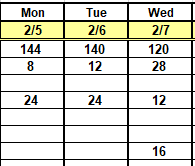
I have a master excel file that pulls data from an online based source to track work in progress steps of specific jobs. That file uses a 5 day format to show this progress. For example, on Wednesday...

JamesMartin001
Feb 17, 2024Copper Contributor
COUNTIFS and or SUMIFS may be the formulas you are looking for. In a cell for each product manager's name, you need the column range for the names, and "name1" as the criteria. COUNTIF or SUMIF may suffice if just one range and name is needed. SUMIF, is a bit more complicated than COUNTIF, as the range to be added has to be detailed first I think
For COUNTIFS and SUMIFS you can include a lower and higher date to trap products to analyse, say if only for this month, then ">31/01/2024" and "<01/03/2024" would have to be added to the range entered twice with either having the date range examples .
You could do an average by dividing the sums by the COUNTIFS for each manager.
For COUNTIFS and SUMIFS you can include a lower and higher date to trap products to analyse, say if only for this month, then ">31/01/2024" and "<01/03/2024" would have to be added to the range entered twice with either having the date range examples .
You could do an average by dividing the sums by the COUNTIFS for each manager.