Forum Discussion

Counting matching cells
- Oct 09, 2022
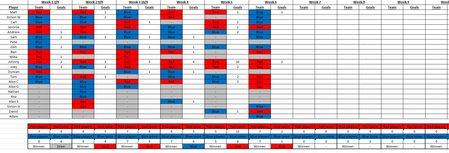
Since the odd-numbered columns in the player rows will never contain Blue or Red, you can use the simpler formula
=COUNTIFS(Sheet2!A$3:AA$3,"Red",Sheet2!A4:AA4,"Red")
to count the number of times the players in rows 3 and 4 both played for red. And the number of times they both played for red AND red won:
=COUNTIFS(Sheet2!A$3:AA$3,"Red",Sheet2!A4:AA4,"Red",Sheet2!B$30:AB$30,"Red")

Since the odd-numbered columns in the player rows will never contain Blue or Red, you can use the simpler formula
=COUNTIFS(Sheet2!A$3:AA$3,"Red",Sheet2!A4:AA4,"Red")
to count the number of times the players in rows 3 and 4 both played for red. And the number of times they both played for red AND red won:
=COUNTIFS(Sheet2!A$3:AA$3,"Red",Sheet2!A4:AA4,"Red",Sheet2!B$30:AB$30,"Red")
 ZongearOct 09, 2022Copper ContributorThank you for your help