Forum Discussion

Counting entries between date/time ranges
- Jul 08, 2020
NeilKloster in the attached is a SUMPRODUCTS() formula that I used because the COUNTIFS() formula wouldn't work because the "dates" in your table are actually TEXT format (you probably imported or copied them in as text). I also went to the DATA tab and used "Text to Columns" to force that column to be actual Date information instead of text and included the correct COUNTIFS() formula in the cell below the other "count" cell to show how it works (that it does work if you correct the text). If you will be importing data a lot and don't want to deal with converting text to number every time use the first. If you want to do more with the data and dates, you might want to convert the text to real dates to make it easier for yourself.

NeilKloster without the sheet it is hard to know for sure. for example I assume the dates in the table are in B3:B17 and the start date is in F2 and the end date is in F3 but what is that last part at looking at column C and checking it again F4? What is F4? Based on the picture it would appear to be "Item" which is blank. Since none of the SLA Cutoff cells are blank the count should be 0. In F4 try putting 7/8/2020 3:00 PM or just delete that part of the equation so you only have:
=COUNTIFS(B3:B17, "<="&F3, B3:B17, ">="&F2)

mtarler Sorry if i made this more confusing than it is.
So basically, that formula I got from another website. But ultimately, I am just looking to count the number of cases that fall between a certain date/time range.
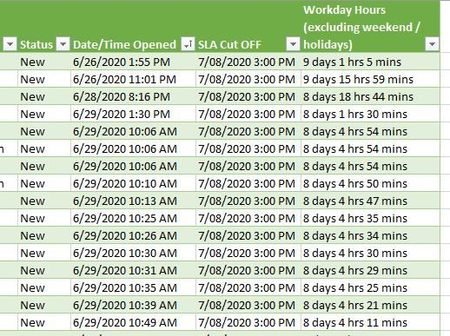
Column E is my Date/time Opened
Column F is my SLA Cut Off (basically our 3:00 PM cut off time)
Column G just shows the days in between minus weekends and holidays.
So just trying to figure out, how many cases would be between select date/time ranges?
Example:
Column E: 6/29/2020 2:59 PM through Column F: 7/8/3030 3:00 PM = #XXX of cases, also need it to take into account weekends & holidays if possible? Is there a way to do that?
I can attach the file too if that helps?
- mtarlerJul 08, 2020Silver Contributoryes including the sheet would help. If col E is opened and F is cut off and you want count of cases that fall between that then where are the dates for those cases? a different table/sheet? How would a COUNT take into account weekends & holidays? either the date is between those dates or not.
- NeilKlosterJul 08, 2020Brass Contributor
Attaching file.
Here is what my spreadsheet looks like:
This is where I'm pulling the data from.
So Is there a way to count how many cases fell between specified date/times?
So if I start with 6/26/2020 1:55 PM and then let's say use a 7/2/2020 2:59 PM cut off date/time. Is there a way to count how many cases fell between that range?
The only way that I am taking weekends and holidays into account is in column G which excludes those items - but I'm worried about the first part first. I may not need to worry about it, if I can get the formula to work between date/time ranges.
I tried using this website for reference - but cannot get it to work for me. Click https://www.get-digital-help.com/count-entries-between-date-and-time-criteria-in-excel/
- mtarlerJul 08, 2020Silver Contributor
NeilKloster in the attached is a SUMPRODUCTS() formula that I used because the COUNTIFS() formula wouldn't work because the "dates" in your table are actually TEXT format (you probably imported or copied them in as text). I also went to the DATA tab and used "Text to Columns" to force that column to be actual Date information instead of text and included the correct COUNTIFS() formula in the cell below the other "count" cell to show how it works (that it does work if you correct the text). If you will be importing data a lot and don't want to deal with converting text to number every time use the first. If you want to do more with the data and dates, you might want to convert the text to real dates to make it easier for yourself.