Forum Discussion

Counting by referencing multiple tables in a single function.
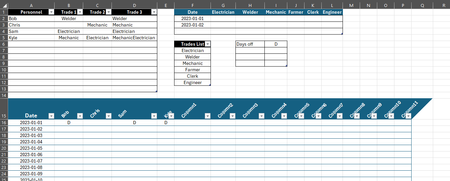

Could you please clarify a bit
Personnel Trades. For example Bob has Welder as Trade 1 and same Welder as Trade 3. Why so ? And, if some reason, Bob is "doubled Welder" and he is off on Jan 1st, does that mean we have TWO Welders off for that date.
Output. That will be much better of in your sample you add as well manually calculated result. Now it is empty in sample.
Input. How critical is such layout of ranges, they are not optimal. If for some reason (which one) we can't use unpivoted layout most probably we shall be do that in formulae and/or helper ranges.
If you'd like to avoid data modelling and PivotTables, which kind of formulas are available in your environment, are you on Excel 365?

- SergeiBaklanMar 08, 2024Diamond Contributor
If to build PivotTable we need to add source data to data model first. Better to do that with Power Query, but if source tables do not require any transformations that could be done directly.
Also directly in Power Pivot or by Power Query to add Data (aka Calendar) table which covers dates for all desired periods.
Relationships could be set as
Measure to use
WasOff:=CALCULATE(
   COUNTROWS(  DaysOff ),
   TREATAS( VALUES(PeopleTrades[Personnel]), DaysOff[Person] )
 )
Resulting PivotTable looks like
- SergeiBaklanMar 08, 2024Diamond Contributor
I see, thank you. If change the input a bit it could be like
with formulae as
=LET(
 nDates, 3,
 nTrades, COUNTA(Trades[Trades]),
 dates, SEQUENCE(nDates,,DATE(2023,1,1) ),
 header, TOROW(Trades[Trades],3),
 offDays, LAMBDA(date,trade,
   LET(
     offNames, FILTER(DaysOff[[Person]:[Person]],
        DaysOff[[Date]:[Date]]=date),
     tradeNames, FILTER(PeopleTrades[[Personnel]:[Personnel]],
        PeopleTrades[[Trade]:[Trade]]=trade),
     IFERROR(SUM(--(offNames=TRANSPOSE(tradeNames) ) ), 0)
 ) ),
 fillOff, MAKEARRAY(
    nDates,
    nTrades,
    LAMBDA(n,m,
      offDays(
          INDEX( dates,n,1),
          INDEX( header,1,m) ) )
  ),
 VSTACK(
    HSTACK( "Date", header ),
    HSTACK( dates, fillOff ) )
)
If such input is not desirable when transpose to like form within calculations.
- BOquinnMar 08, 2024Copper ContributorApologies for the confusion Sergie, but we're looking for a solution that doesn't require VBA or coding, as they want to be able to make adjustments once I've completed my term - is the desired output possible with only functions and formulas?
- SergeiBaklanMar 08, 2024Diamond Contributor
Both do not require VBA.
First one is regular formula which uses Excel 365 function. You may copy/paste that formula in formula bar (or check it in the attached file) and it shall work. Since that's multiline formula better to expand formula bar.
Second one uses data model which shall be available practically on any more or less modern version of Excel Desktop. On Windows, not on Mac. Here is also no VBA coding. Tools to work with data model (build relationships, add measures) are within Excel.