Forum Discussion

Counting across a dynamic range
 Jun 07, 2023
I work with the german version of Excel. Since it's not translated when you open the attached file i've highlighted the steps of the query in the screenshots.
In order to append the tables follow this step.
Then you can add ("Hinzuf.." in the screenshot) the tables and confirm with ok.
Then select all columns - all columns are green / selected and the unpivot then columns as indicated.
Then you can remove the column without the names. I have not made a screenshot fot this step. You can select the column and right-click with the mouse and choose remove.
Then group the column with the names as shown in the screenshot. "Zeilen zählen" is count rows.
If you want you can rename the column. Doubleclick in the header and enter a new column title.
The query works in my file.
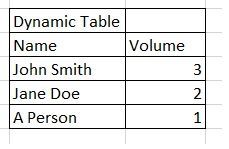
An alternative could be Power Query. In the attached file you can add data to the blue dynamic table. Then you can click in any cell of the green table and right-click with the mouse and select refresh to update the green result table.

OliverScheurich Hi, thanks for this - it looks like exactly what I'm after, however the data i want to query is already a power query. Can i stack it, and there will be 4-5 separate ranges within the data I'll need to do the same for.
What steps need to be replicated, apologies - i'm not greatly familiar with power query, and the steps appear to be in another language and I can't alter it.
- OliverScheurichJun 07, 2023Gold Contributor
I work with the german version of Excel. Since it's not translated when you open the attached file i've highlighted the steps of the query in the screenshots.
In order to append the tables follow this step.
Then you can add ("Hinzuf.." in the screenshot) the tables and confirm with ok.
Then select all columns - all columns are green / selected and the unpivot then columns as indicated.
Then you can remove the column without the names. I have not made a screenshot fot this step. You can select the column and right-click with the mouse and choose remove.
Then group the column with the names as shown in the screenshot. "Zeilen zählen" is count rows.
If you want you can rename the column. Doubleclick in the header and enter a new column title.
The query works in my file.
- Stryfe24Jun 08, 2023Tin ContributorPerfect! Thanks so much for the step by step, exactly what i wanted 🙂