Forum Discussion

COUNTIFS to count if data values in Column B are higher than the data values in Column A
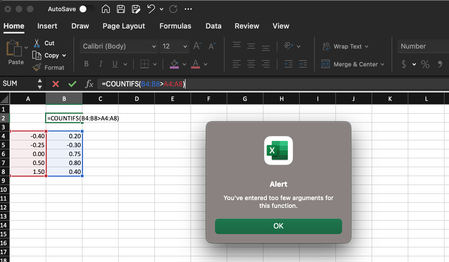

Your attempt at using the COUNTIFS function is almost correct, but it needs a slight adjustment to work properly. COUNTIFS requires multiple conditions to be specified separately, and you cannot directly compare two ranges like B4:B8>A4:A8 within a single condition. Instead, you can use two separate conditions to achieve your goal. Here's the correct formula:
=COUNTIFS(B4:B8,">"&A4:A8)
This formula will count the number of occurrences where the values in Column B are higher than the corresponding values in Column A within the specified range.
My answers are voluntary and without guarantee!
Hope this will help you.
Was the answer useful? Mark as best response and like it!
This will help all forum participants.

Thanks NikolinoDE, but that did not work. That formula populated an array of five different numbers! I am looking for it to return a single number, 3.
- Detlef_LewinMar 20, 2024Silver Contributor
- Mike_D4268Mar 20, 2024Copper ContributorThanks Detlet Lewin, your =SUM formula was successful. I appreciate it! The user OliverScheurich provided a formula that also worked...
