Forum Discussion

CountIFS formula with Asterisk *
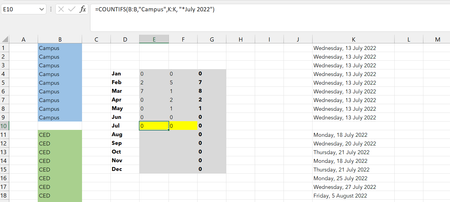
- Sep 14, 2022
Try this one:
=COUNTIFS(B:B,"Campus",K:K,">="&DATE(2022,7,1),K:K,"<="&DATE(2022,7,31))Column K contains real dates. Excel stores dates as sequential numbers starting at 1 on January 1, 1900. Although you have formatted the date to display as shown in the picture, the cell does not contain a text like "July 2022". You need to use proper date values (lower and upper boundary) to find dates in July 2022.
Example attached.

Try this one:
=COUNTIFS(B:B,"Campus",K:K,">="&DATE(2022,7,1),K:K,"<="&DATE(2022,7,31))
Column K contains real dates. Excel stores dates as sequential numbers starting at 1 on January 1, 1900. Although you have formatted the date to display as shown in the picture, the cell does not contain a text like "July 2022". You need to use proper date values (lower and upper boundary) to find dates in July 2022.
Example attached.

(I want to be able to duplicate these for each year without having to fix up the formulae for each month every year...)
- Riny_van_EekelenSep 15, 2022Platinum Contributor
Sun_H You can enter the month, last day of the month and year in separate cells and refer to these rather then hard coding them in each formula.
Edit: I've now attached a file demonstrating how you could make your file more dynamic.