Forum Discussion

Sun_H
Sep 13, 2022Copper Contributor
CountIFS formula with Asterisk *
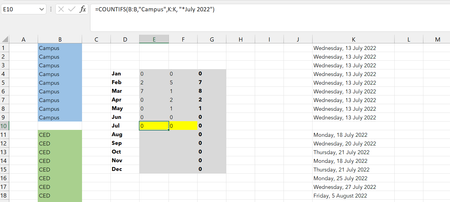
Hi all, Would appreciate your help with this formula containing CountIFS with * I want to count the number of cells containing "Campus" and "July" and then "CED" and July". For some reason the coun...
- Sep 14, 2022
Try this one:
=COUNTIFS(B:B,"Campus",K:K,">="&DATE(2022,7,1),K:K,"<="&DATE(2022,7,31))Column K contains real dates. Excel stores dates as sequential numbers starting at 1 on January 1, 1900. Although you have formatted the date to display as shown in the picture, the cell does not contain a text like "July 2022". You need to use proper date values (lower and upper boundary) to find dates in July 2022.
Example attached.

Riny_van_Eekelen
Sep 14, 2022Platinum Contributor
Try this one:
=COUNTIFS(B:B,"Campus",K:K,">="&DATE(2022,7,1),K:K,"<="&DATE(2022,7,31))
Column K contains real dates. Excel stores dates as sequential numbers starting at 1 on January 1, 1900. Although you have formatted the date to display as shown in the picture, the cell does not contain a text like "July 2022". You need to use proper date values (lower and upper boundary) to find dates in July 2022.
Example attached.

Sun_H
Sep 14, 2022Copper Contributor
Oh yes that worked, thank you so much!! I thought it might have had something to do with the cell content! So very much appreciated!