Forum Discussion

Sun_H
Sep 13, 2022Copper Contributor
CountIFS formula with Asterisk *
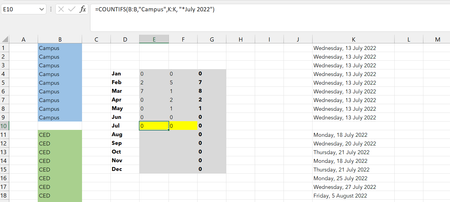
Hi all, Would appreciate your help with this formula containing CountIFS with * I want to count the number of cells containing "Campus" and "July" and then "CED" and July". For some reason the coun...
- Sep 14, 2022
Try this one:
=COUNTIFS(B:B,"Campus",K:K,">="&DATE(2022,7,1),K:K,"<="&DATE(2022,7,31))Column K contains real dates. Excel stores dates as sequential numbers starting at 1 on January 1, 1900. Although you have formatted the date to display as shown in the picture, the cell does not contain a text like "July 2022". You need to use proper date values (lower and upper boundary) to find dates in July 2022.
Example attached.


Harun24HR
Sep 13, 2022Silver Contributor
Column K data are texts or dates? Share a sample workbook.

Sun_H
Sep 13, 2022Copper Contributor
Colum K is dates, in the given date format..
How do I attach a file please? Can't seem to find an option for it...
- Harun24HRSep 13, 2022Silver ContributorShare link by uploading to onedrive or google drive. In case of comment open full text editor. At the end of editing box you will find an option to attach file. Click browse to select file from your storage disk.