Forum Discussion

COUNTIFS by Month Excluding Year
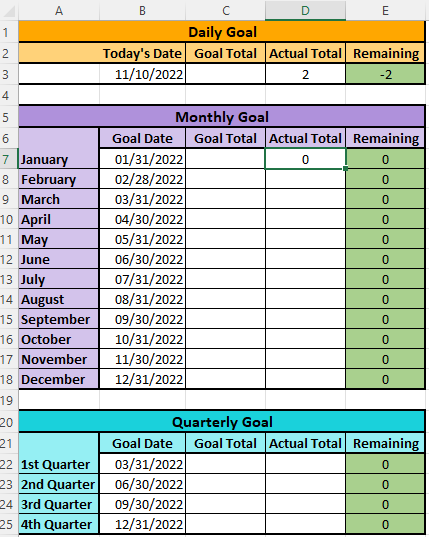

It appears you have lots of 0s in that column. Try this and make sure the formula is not pointed at the entire column:
=COUNT(IF(TEXT(A2:A10,"mmm")="Jan",IF(A2:A10<>0,A2:A10)))
The 0s in column E are a sum equation for C - D to determine the remaining Goal. The column I'm pulling from is on a separate tab. The goal is for the equation on the Goals sheet in Column D to count the number of closed dates in the month shown in Column A, pulling it from the named column F on the second tab. Does that make sense?
- Patrick2788Nov 12, 2022Silver Contributor
You could use of these two options:
Legacy ctrl+shift+enter array
=COUNT(IF(TEXT(Sheet2!$F$2:$F$10,"mmmm")=A2,IF(Sheet2!$F$2:$F$10<>0,Sheet2!$F$2:$F$10)))365:
=LET(dates,Sheet2!$F$2:$F$10,filtered,FILTER(dates,(TEXT(dates,"mmmm")=A2)*(dates<>0)),COUNT(filtered)) - PeterBartholomew1Nov 12, 2022Silver Contributor
It would appear that an entire column reference has crept into your calculation. The formula
= MONTH(emptyColumn)

"for example,"
= MONTH(Z:Z)
would return precisely 1048576 zeros, so it appears that your formula contains 3 mismatches. I doubt that is the value you wish to determine! Personally, I never use direct cell references or entire column references (except rarely for range intersection) so I am not well-placed to address your problem.
