Forum Discussion

matt0020190
Feb 17, 2025Brass Contributor
Countifs a selected month is between date range
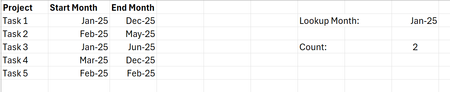
Hi all I may be getting confused with this one, but essentially I have the following table: I am trying to use COUNTIFS to count how many projects from the table are between the date range (...
- Feb 18, 2025
Perhaps
=CHOOSECOLS(FILTER(A2:C1000, (B2:B1000<=AA3)*(C2:C1000>=AA3)), 1, 3)

HansVogelaar
Feb 17, 2025MVP
Let's say the start month is in B2:B6, the end month in C2:C6 and the lookup month in I2. In I4:
=COUNTIFS(B2:B6, "<="&I2, C2:C6, ">="&I2)
 matt0020190Feb 17, 2025Brass Contributor
Hi HansVogelaar
Thank you for the quick response.
If I was to use this in a FILTER formula as follows, how would it be incorporated?
=FILTER(FILTER($A:$C,COUNTIFS($B2:$B6, "<="&$AA$3, $C2:$C6, ">="&$AA$3)),{1,0,1}))
- HansVogelaarFeb 18, 2025MVP
Perhaps
=CHOOSECOLS(FILTER(A2:C1000, (B2:B1000<=AA3)*(C2:C1000>=AA3)), 1, 3)
- Harun24HRFeb 17, 2025Silver Contributor
To get same result by FILTER() function, you may try-
=SUM(--(FILTER(B2:B6,(B2:B6<=I2)*(C2:C6>=I2))<>""))
