Forum Discussion

Countif
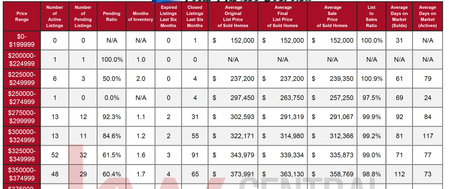

For starting it is better to keep the upper limit of the price range on a seperate column. Like an additional column on the right of price range column to hold the upper limit like 199.999, 224.999... You can hide it if you do not want it to be seen. You can automatically create upper and lower limits as text depending on this column values however this is another issue.
Then you can use the TODAY()-90 function to get the date 90 days before today, this will update whenever you reopen the file or the page recalculates so to keep things simple and fast I advise you use this in a seperate cell and reference this cell address instead.
To find whatever you need you can use COUNTIFS instead. I cannot see the date coumn in your picture. so I cannot help with the actual formula. But if your dates are on Column E and your newly created upper limit coulumn in B and your date criteria is in B2 and you have 500 rows of data you can use:
=COUNTIFS($E$1:$E$500, ">="&B2 ,$B$1:$B$500, "150")
150 here in the formula is the upper limit
 SHAMROCK17May 21, 2020Copper Contributor
Thank you for the reply. Separating the values between two columns works great. I've provided the spreadsheet as well as a more detailed explanation. As I am still a bit lost with syntax.
In cell E5 of the Reports page I want to count the number of Active listings with a list price >=A5 and <=B5
The cell reference would be:
Data page, column R("Status") =A
Data page, column X(List Price)
Hopefully this makes a bit more sense.
Thank you