Forum Discussion

COUNTER.IF ASSISTANCE
- Aug 17, 2023
Thanks! See the attached version.
I added three helper columns that calculate the top 3 of each row.

Could you attach a small sample workbook demonstrating the problem (without sensitive data), or if that is not possible, make it available through OneDrive, Google Drive, Dropbox or similar?

Hi, here is a link to the google drive with the file:
https://docs.google.com/spreadsheets/d/1YrhxbEo76fHzL2q7S-ABHRYu57ipWd5J/edit?usp=sharing&ouid=106982262961509275050&rtpof=true&sd=true
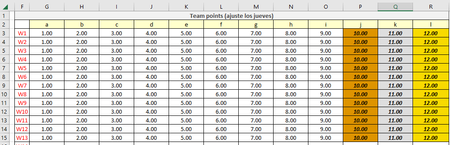
In the next picture you can see the 2 tables to work with (team points & weekly pot winner)
Team points is where you input the data and the weekly pot winner is where the counter of max values is set in each cell that has a 0.
By default all the max values (cells in gold) are assigned to team l, you can try giving the max value to other team and check the weekly pot winner table to notice that the counter is not counting all the max values that are in the whole team points table.
Here is a small example with scattered max values (I just typed random numbers higher than 12):
Here the weekly pot winner table should display that:
-team d had the max value 1 time.
-team c had the max value 1 time.
-team f had the max value 1 time.
-team l had the max value 10 times.
But as you can see, it only shows when team f has the max value.
- HansVogelaarAug 17, 2023MVP
Thanks! See the attached version.
I added three helper columns that calculate the top 3 of each row.
- EVG08Aug 18, 2023Copper ContributorI was really stressed thinking in a way to solve that problem. Thank you for your assistance!