Forum Discussion

ingezwetsloot
Aug 15, 2024Copper Contributor
Count unique values including specific character
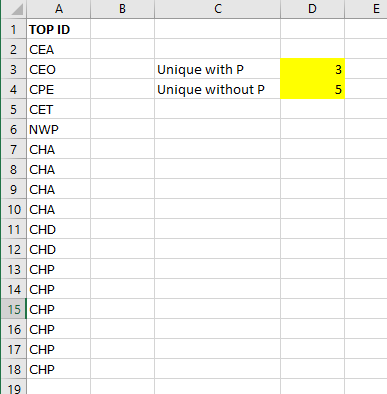
Hi, please help... Which formula can I use to create the numbers in yellow? From column A I would like to count the unique values containing a "P" Thank you already for helping!

djclements
Aug 15, 2024Silver Contributor
ingezwetsloot In the interest of "best practices", it's generally not advisable to combine COUNTA with FILTER, because it's incapable of returning 0 when the FILTER function does not find any matching records. For example, if you were to count unique values containing "Z" in this same scenario, it would return 1 even though no records contain the letter "Z". There are plenty of documented workarounds (e.g. using IFERROR and ROWS instead of COUNTA); however, in this particular scenario, you could also try either of the following...
//unique count containing "P" (not case-sensitive)
=SUM(N(ISNUMBER(SEARCH("p", UNIQUE(A2:A18)))))

//unique count does not contain "P" (not case-sensitive)
=SUM(N(ISERR(SEARCH("p", UNIQUE(A2:A18)))))

//unique count containing "P" (case-sensitive)
=SUM(N(ISNUMBER(FIND("P", UNIQUE(A2:A18)))))

//unique count does not contain "P" (case-sensitive)
=SUM(N(ISERR(FIND("P", UNIQUE(A2:A18)))))
Cheers!