Forum Discussion

Bourrinho
Feb 28, 2024Tin Contributor
Count the number of dates that fall within a certain month
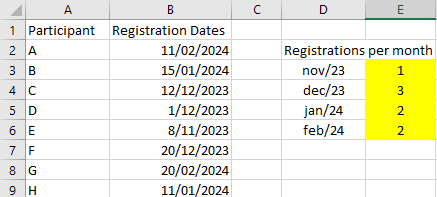
Hi, I'm looking for a formula that counts the number of dates in a list fall within a certain month. If at all possible without intermediate steps. To be more specific, I'm wondering if there's...
- Feb 29, 2024
In general that could be
=SUMPRODUCT(
    ( IFERROR( N(MONTH($B$2:$D$7)), 0) = MONTH($F2) ) *
    ( IFERROR( N(YEAR($B$2:$D$7)), 0) = YEAR($F2) )*
    ISODD( ROW($B$2:$D$7) )
)
by adding one more criteria. Details depends on content, do you mean odd row within the grid, or odd row counting from the start of the range.

SergeiBaklan
Feb 28, 2024Diamond Contributor
Easiest way is to create PivotTable. If with formula, in column D do you have texts or dates formatted as mmm/yy ?

Bourrinho
Feb 28, 2024Tin Contributor
In column D it's dates formated as mmm/yy.
Would a pivot also work if there's multiple columns to count? I used a simplified example but in reality will be about 10 columns of dates (e.g. project 1 registration, Proj 2,...). Then I would like to have the count per month per project (ie a table with for example projects listed horizontally and then listing the applicable months in date format as rows below)
- SergeiBaklanFeb 28, 2024Diamond Contributor
Nope, PivotTable won't work such way, at least directly. As variant that could be like
=SUMPRODUCT( --(MONTH(range)=MONTH(fromDateCell))assuming in range are dates
- BourrinhoFeb 28, 2024Tin ContributorProblem here could be that months can have a different year. (could e.g. be Feb 2023 and 2024 in list)
- SergeiBaklanFeb 28, 2024Diamond Contributor