Forum Discussion

Count odd or even cells that have a date value
- Feb 06, 2024
As variant
=SUMPRODUCT( ISEVEN(ROW($B$2:$B$13 ))*ISNUMBER($B$2:$B$13)  )
=SUMPRODUCT( ISODD(ROW($B$2:$B$13 ))*ISNUMBER($B$2:$B$13)  )


Hi,
Is your date always in "dd/mm/yyyy" format? if so, you can use =ISNUMBER(DATEVALUE(TEXT(B2,"dd/mm/yyyy"))) to check whether the content of the cell is a date or not first. and then use COUNTIFS.

Hi rachel
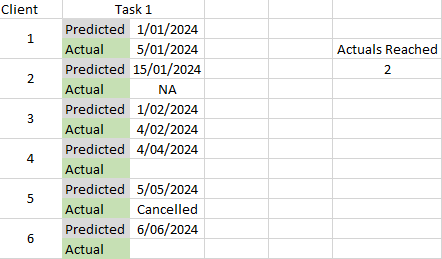
that could work if the file was small like above. However I picked a simple example to not make my explanation sound to difficult and just search for the formula. The actual file looks like below. E.g. Students having to complete a certain task within a certain window based upon their start date. To count the number of subjects starting, I could easily do this by counting the cells that have a start date (COUNTA). For the "Tasks", I would like to have a count each time a completion date was added. So in the example below, I would like to have that Task 1 shows 2 completions on top as 2 completion dates were added for the participating students.