Forum Discussion

Count IF
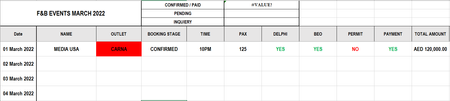

jpilard Not sure about your cell and column references but I guess that you want a formula in F1 that sums amounts from column K in case cells in column D ae equal to "CONFIRMED". If so, try this:
=SUMIF(D:D,"CONFIRMED",K:K)
 jpilardFeb 05, 2022Copper Contributor
- Riny_van_EekelenFeb 05, 2022Platinum Contributor
jpilard You may start by giving the complete picture. What second criteria?
Perhaps you can share your sheet via dropbox or something similar. Or, when you upload a screenshot, include the row and column headers so that it is clear how your schedule looks like and include examples of what you would want a formula to return in such examples.
- jpilardFeb 05, 2022Copper Contributor
https://www.dropbox.com/scl/fi/3s9zlaetdpdsrc2orygj2/Events-Planner-2022-1.xlsx?dl=0&rlkey=v2jromw6kpougbc2rrmmgahxj
With your help i have managed to get the overall amount based on criteria
CONFIRMED / PAID AED 265,000.00 INQUIERY AED 0.00 CANCEL AED 75,000.00 Now whatever is confirmed or Inquiry or Cancel I would like to get it breakdown per outlets
PRIVILEGE CARNA FI'LIA SBAR Thanks a lot,