Forum Discussion

Count how many people worked on a task - Dropdown menu
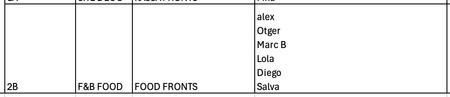
- Jun 21, 2024
Make sure that you use straight double quotes "", not curly quotes. And refer to E2 throughout:
=IF(E2="", 0, LEN(E2)-LEN(SUBSTITUTE(E2, CHAR(10), ""))+1)
And if you use comma as decimal separator, you should use semicolon ; between the arguments of the functions:
=IF(E2=""; 0; LEN(E2)-LEN(SUBSTITUTE(E2; CHAR(10); ""))+1)

Let's say the cell with the people who worked on it is D2.
The number of people is
=IF(D2="", 0, LEN(D2)-LEN(SUBSTITUTE(D2, CHAR(10), ""))+1)
This can be filled down.
 Lien_Van_VaerenberghJun 21, 2024Copper Contributor
Thank you so much for your quick reply.
I get the notificiation that there's something wrong with the formula.
The cell containing the names from a drop down is E2 in my case.
- HansVogelaarJun 21, 2024MVP
Make sure that you use straight double quotes "", not curly quotes. And refer to E2 throughout:
=IF(E2="", 0, LEN(E2)-LEN(SUBSTITUTE(E2, CHAR(10), ""))+1)
And if you use comma as decimal separator, you should use semicolon ; between the arguments of the functions:
=IF(E2=""; 0; LEN(E2)-LEN(SUBSTITUTE(E2; CHAR(10); ""))+1)
- Lien_Van_VaerenberghJun 23, 2024Copper Contributor