Forum Discussion

Copy rows from one set of sheets to another set of sheets, based on a condition
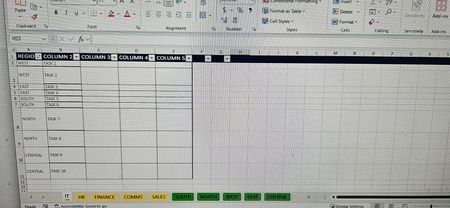

To accomplish the task of copying rows based on a condition (region) from multiple sheets (focus areas) to another set of sheets (regions) in Excel, you can use VBA (Visual Basic for Applications). VBA allows you to automate repetitive tasks, such as copying data based on conditions, across multiple sheets. VBA is not supported in Excel Online. Excel Online provides a subset of the features available in the desktop version of Excel, but it does not include the capability to run or create VBA macros.
Here's a step-by-step guide on how to set up a VBA macro to achieve this:
Step 1: Open the VBA Editor
- Press Alt + F11 to open the VBA editor.
- In the VBA editor, insert a new module:
- Right-click on any existing module or the workbook name in the Project Explorer.
- Select Insert > Module.
Step 2: Write the VBA Code
Copy and paste the following VBA code into the new module:
Vba Code is untested backup your file first.
Sub CopyTasksToRegionSheets()
    Dim focusAreas As Variant
    Dim regions As Variant
    Dim ws As Worksheet
    Dim regionSheet As Worksheet
    Dim lastRow As Long
    Dim targetRow As Long
    Dim region As String
    Dim i As Long

    ' Define the focus area sheets and region sheets
    focusAreas = Array("IT", "HR", "FINANCE", "COMMS", "SALES")
    regions = Array("SOUTH", "NORTH", "WEST", "EAST", "CENTRAL")

    ' Clear the region sheets before copying new data
    For Each region In regions
        Set regionSheet = ThisWorkbook.Sheets(region)
        ' Assuming you want to clear all existing data except the header row
        regionSheet.Rows("2:" & regionSheet.Rows.Count).ClearContents
    Next region

    ' Loop through each focus area sheet
    For Each focusArea In focusAreas
        Set ws = ThisWorkbook.Sheets(focusArea)
        lastRow = ws.Cells(ws.Rows.Count, "A").End(xlUp).Row

        ' Loop through each row in the focus area sheet
        For i = 2 To lastRow ' Assuming the first row is the header
            region = ws.Cells(i, "B").Value ' Assuming region is in column B

            ' Copy the row to the corresponding region sheet
            Set regionSheet = ThisWorkbook.Sheets(region)
            targetRow = regionSheet.Cells(regionSheet.Rows.Count, "A").End(xlUp).Row + 1
            ws.Rows(i).Copy Destination:=regionSheet.Rows(targetRow)
        Next i
    Next focusArea

    MsgBox "Tasks have been successfully copied to their respective region sheets!"
End Sub
Step 3: Run the VBA Macro
- Close the VBA editor and return to Excel.
- Press Alt + F8 to open the Macro dialog box.
- Select CopyTasksToRegionSheets and click Run.
Explanation of the VBA Code
- Arrays for Focus Areas and Regions: The focusAreas and regions arrays store the names of the sheets corresponding to each focus area and region, respectively.
- Clearing Existing Data: The code clears existing data in the region sheets except for the header row.
- Loop Through Focus Areas: The code loops through each focus area sheet and each row within those sheets.
- Copy Rows Based on Condition: For each row, the code checks the region specified in column B and copies the row to the corresponding region sheet.
This setup ensures that tasks from each focus area are copied to the appropriate region sheet based on the specified region in column B. Modify the column references as needed to match your actual sheet structure. The text, steps and functions were created with the help of AI.
My answers are voluntary and without guarantee!
Hope this will help you.
Was the answer useful? Mark as best response and Like it!
This will help all forum participants.
 MadisonScottAug 12, 2024Copper ContributorThanks for answering, I found it useful for me.
 happyhourandtacosJul 26, 2024Copper ContributorThank you for such a fulsome response!! I did try this out - I used ctrl a then ctrl v to copy and paste into the VBA editor and received and error message:
"Compile error:
For Each control variable must be Variant or Object"- NikolinoDEJul 27, 2024Platinum Contributor
Sub CopyTasksToRegionSheets()
    Dim focusAreas As Variant
    Dim regions As Variant
    Dim ws As Worksheet
    Dim regionSheet As Worksheet
    Dim lastRow As Long
    Dim targetRow As Long
    Dim region As String
    Dim i As Long
    Dim focusArea As Variant

    ' Define the focus area sheets and region sheets
    focusAreas = Array("IT", "HR", "FINANCE", "COMMS", "SALES")
    regions = Array("SOUTH", "NORTH", "WEST", "EAST", "CENTRAL")

    ' Clear the region sheets before copying new data
    For Each region In regions
        Set regionSheet = ThisWorkbook.Sheets(region)
        ' Assuming you want to clear all existing data except the header row
        regionSheet.Rows("2:" & regionSheet.Rows.Count).ClearContents
    Next region

    ' Loop through each focus area sheet
    For Each focusArea In focusAreas
        Set ws = ThisWorkbook.Sheets(focusArea)
        lastRow = ws.Cells(ws.Rows.Count, "A").End(xlUp).Row

        ' Loop through each row in the focus area sheet
        For i = 2 To lastRow ' Assuming the first row is the header
            region = ws.Cells(i, "B").Value ' Assuming region is in column B

            ' Copy the row to the corresponding region sheet
            Set regionSheet = ThisWorkbook.Sheets(region)
            targetRow = regionSheet.Cells(regionSheet.Rows.Count, "A").End(xlUp).Row + 1
            ws.Rows(i).Copy Destination:=regionSheet.Rows(targetRow)
        Next i
    Next focusArea

    MsgBox "Tasks have been successfully copied to their respective region sheets!"
End Sub
The error "For Each control variable must be Variant or Object" indicates that the control variable in your For Each loop must be declared as a Variant or Object. In the provided code, the control variable focusArea needs to be declared correctly.
In this code, I've declared focusArea as a Variant to avoid the compile error.
Hope this helps you.
- happyhourandtacosJul 31, 2024Copper Contributor
Hi there, thank you so much, but still receiving the same error. I did double check that I used the new code.
After I receive the error, when I go back to The VBA editor, if yiu look at line 17 (For Each region In regions), 'region' is highlighted.
When I ran the first code you gave me, it was the same error and same highlighted section.