Forum Discussion

mikeb1028
Dec 05, 2021Copper Contributor
Copy rows from multiple sheets to final "summary" sheet and not include empty "blank" rows
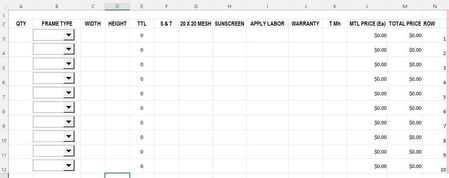
OS: Windows 11 Excel: 365 I have several sheets that perform price calculations. The user will enter a quantity, type, options, and each row is formulated. One sheet has 9 rows, another sheet ha...

mtarler
Dec 06, 2021Silver Contributor
it is really hard without a sample sheet. To maximize compatibility i would suggest sticking with sheet functions. Since you are on 365 you can get pretty fancy with the LET() and FILTER() functions. For example you could use FILTER for each sheet to only include rows that aren't empty and then 'build' them back together using counts and choose functions. I imagine something like (untested and just off the top of my head):
LET(a, FILTER(sheet1!a1:n20, sheet1!l1:l20>0,""),
b, FILTER(sheet2!a1:n20, sheet2!l1:l20>0,""),
c, FILTER(sheet3!a1:n20, sheet3!l1:l20>0,""),
s, SEQUENCE(rows(a)+rows(b)+rows(c)),
IFS(s<=rows(a),index(a,s,),s<=rows(a)+rows(b), index(b,s-rows(a),),true,index(c,s-rows(a)-rows(b),)))
LET(a, FILTER(sheet1!a1:n20, sheet1!l1:l20>0,""),
b, FILTER(sheet2!a1:n20, sheet2!l1:l20>0,""),
c, FILTER(sheet3!a1:n20, sheet3!l1:l20>0,""),
s, SEQUENCE(rows(a)+rows(b)+rows(c)),
IFS(s<=rows(a),index(a,s,),s<=rows(a)+rows(b), index(b,s-rows(a),),true,index(c,s-rows(a)-rows(b),)))

mikeb1028
Dec 06, 2021Copper Contributor
Thank you for the response. Today at work I searched and found some VBA code to show/hide rows based on the value in a cell. In my case, if the value carried over is "0" - unused value from the other sheet, it would hide the row. I found Worksheet_SelectionChange which does the trick in realtime but to change the status (hide/unhide), I have to click somewhere on the sheet where this code is located and acting on. It is working, though.
We are now looking at replacing the tablets with Windows-based tablets so VBA and other developer functions can be used.
I will look at your code some more.
Thank you again!
Mike
We are now looking at replacing the tablets with Windows-based tablets so VBA and other developer functions can be used.
I will look at your code some more.
Thank you again!
Mike