Forum Discussion

purkeenjee
Oct 15, 2020Copper Contributor
Copy cells from one sheet to another
Hi guys, I'm making an excel project for my work regarding inventory of items. I wanted to know how to copy certain rows/cells from one sheet to another sheet. Sheet 1 provides all the items ...

purkeenjee
Oct 18, 2020Copper Contributor
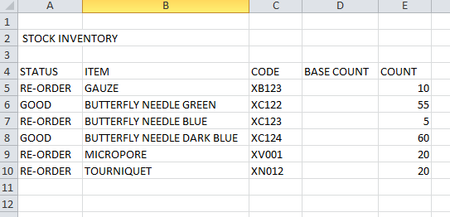
Thanks for your response. I've uploaded the excel file for you to check. I'm using Excel 2010, I know it's kind of outdated but it's the version we have in the hospital. I prefer formula rather than VBA as I'm not really trained for the latter.
Thanks again for your help. Any suggestion is appreciated 🙂

Subodh_Tiwari_sktneer
Oct 18, 2020Silver Contributor
Please try this Array Formula which requires confirmation with Ctrl+Shift+Enter instead of Enter alone.
On Ordering Sheet
In A5
=IFERROR(INDEX(ITEMS!B$5:B$38,SMALL(IF(ITEMS!$A$5:$A$38="Re-Order",ROW($A$5:$A$38)-ROW($A$5)+1),ROWS(A$5:A5))),"")Confirm with Ctrl+Shift+Enter and then copy it across to next column and down the rows.
Or you may try this Regular Function which doesn't require any special keystroke.
In A
=IFERROR(INDEX(ITEMS!B$5:B$38,SMALL(IF(ITEMS!$A$5:$A$38="Re-Order",ROW($A$5:$A$38)-ROW($A$5)+1),ROWS(A$5:A5))),"")and then copy it across to next column and down the rows.
The attached file contains both the formulas.