Forum Discussion

Copy cells from one sheet to another
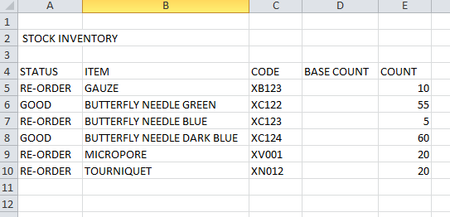

Which Excel version you are using? Do you have access to the dynamic array formulas?
There are two ways you can achieve this, Formulas and VBA, which way would you prefer?
Can you upload a sample workbook instead of an image to work with?
 purkeenjeeOct 18, 2020Copper Contributor
Thanks for your response. I've uploaded the excel file for you to check. I'm using Excel 2010, I know it's kind of outdated but it's the version we have in the hospital. I prefer formula rather than VBA as I'm not really trained for the latter.
Thanks again for your help. Any suggestion is appreciated 🙂
- Subodh_Tiwari_sktneerOct 18, 2020Silver Contributor
Please try this Array Formula which requires confirmation with Ctrl+Shift+Enter instead of Enter alone.
On Ordering Sheet
In A5
=IFERROR(INDEX(ITEMS!B$5:B$38,SMALL(IF(ITEMS!$A$5:$A$38="Re-Order",ROW($A$5:$A$38)-ROW($A$5)+1),ROWS(A$5:A5))),"")Confirm with Ctrl+Shift+Enter and then copy it across to next column and down the rows.
Or you may try this Regular Function which doesn't require any special keystroke.
In A
=IFERROR(INDEX(ITEMS!B$5:B$38,SMALL(IF(ITEMS!$A$5:$A$38="Re-Order",ROW($A$5:$A$38)-ROW($A$5)+1),ROWS(A$5:A5))),"")and then copy it across to next column and down the rows.
The attached file contains both the formulas.