Forum Discussion

Daniela33
Nov 26, 2021Copper Contributor
Convert column into notes and apply to other columns
Hello, I have a curiosity. Can I convert some column into notes and apply those notes to other column? For example, how do I convert the last three column into notes and apply them to the Injur...

LizeMarie
Oct 27, 2022Brass Contributor
OMW Hans you are absolutely awesome, made my day. Thank you.
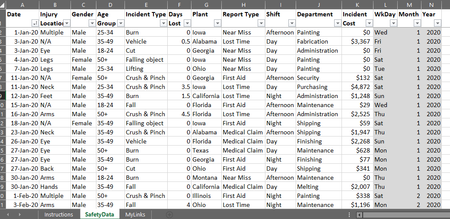
If Column I & J & K matches Column B & C & D then it must copy only the notes in Range("L:O") to Range ("E:H"). so it must loop trough each row finding a match and past the correct notes to that matching row. So if Range("I1:K1) match Range("B10:D10") it must past only the notes of Range("L1:O1") to Range("E10:H10") ... and loops through all doing the same. hope it makes sense
If Column I & J & K matches Column B & C & D then it must copy only the notes in Range("L:O") to Range ("E:H"). so it must loop trough each row finding a match and past the correct notes to that matching row. So if Range("I1:K1) match Range("B10:D10") it must past only the notes of Range("L1:O1") to Range("E10:H10") ... and loops through all doing the same. hope it makes sense

HansVogelaar
Oct 27, 2022MVP
Does this work?
Sub CopyComments()
    Dim r As Long
    Dim m As Long
    Dim v As Variant
    Dim c As Long
    Application.ScreenUpdating = False
    m = Range("B" & Rows.Count).End(xlUp).Row
    For r = 2 To m
        v = Evaluate("MATCH(1,(I:I=B" & r & ")*(J:J=C" & r & ")*(K:K=D" & r & "),0)")
        If IsNumeric(v) Then
            For c = 1 To 4
                If Not Cells(v, c + 11).Comment Is Nothing Then
                    Cells(r, c + 4).AddComment Text:=Cells(v, c + 11).Comment.Text
                End If
            Next c
        End If
    Next r
    Application.ScreenUpdating = True
End Sub- LizeMarieOct 27, 2022Brass ContributorHans you have absolutely no idea how much I appreciate this. you are so helpful and kind to do so. This is what I'm looking for, for so long and I just couldn't get my VBA code to work. Amazing. Thank you again. Just show me that there is still much to learn about VBA coding.