Forum Discussion

AcctMgmtAdmin
Apr 25, 2024Copper Contributor
Connecting Separate Excel sheets for Asset Management
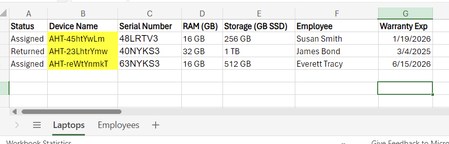
Hi, am working on a simple asset management solution for my company using Excel. The spreadsheets will eventually become data sources for a power app that will make the asset tracking more user frien...

MAngosto
Apr 25, 2024Iron Contributor
My approach would be to insert the following formula in the Employee tab. The formula would look for the laptop name once there is an employee name on that tab as well as information about that new employee in the laptop sheet.
=IFERROR(INDEX(Laptops!$A$2:$G$5,MATCH(A5,Laptops!$F$2:$F$5,0),2);"")
Try inserting one new Employee in the laptops tab with all corresponding data and then insert that same employee name in A5 on employees tab. Then, in the column of laptop name put the formula.