Forum Discussion

Conditionally merge cells based on number?
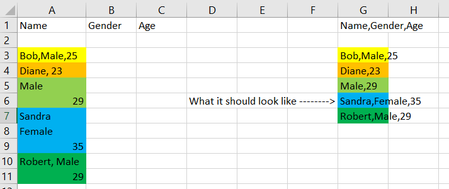
 Aug 11, 2022
Sub merge() Dim i As Long Dim x As Variant Dim result As String Dim k As Long Dim m As Long Range("B:B").Clear m = Range("A" & Rows.Count).End(xlUp).Row k = 3 For i = 3 To m x = Right(Cells(i, 1), 1) If IsNumeric(x) Then Cells(k, 2).Value = Trim(result & " " & Cells(i, 1).Value) k = k + 1 result = "" Else result = Trim(result & " " & Cells(i, 1).Value) End If Next i End SubMaybe with this code. In the attached file you can click the button in cell D2 to run the macro.
Sub merge()

Dim i As Long
Dim x As Variant
Dim result As String
Dim k As Long
Dim m As Long

Range("B:B").Clear

m = Range("A" & Rows.Count).End(xlUp).Row
k = 3

For i = 3 To m

x = Right(Cells(i, 1), 1)
If IsNumeric(x) Then

Cells(k, 2).Value = Trim(result & " " & Cells(i, 1).Value)
k = k + 1
result = ""

Else

result = Trim(result & " " & Cells(i, 1).Value)

End If

Next i

End Sub
Maybe with this code. In the attached file you can click the button in cell D2 to run the macro.

Would love a simple easy-to-understand explanation for the rest if possible! 🙂
Code (my two comments have an ' before them):
Option Explicit
Sub merge_cells_together()
'Name your variables wit the Dim as long, dim the result as a string and dim x as a variant (no specific data type)
Dim i As Long
Dim x As Variant
Dim result As String
Dim k As Long
Dim m As Long
'Clear all of column B
Range("B:B").Clear
m = Range("A" & Rows.Count).End(xlUp).Row
k = 3
For i = 3 To m
x = Right(Cells(i, 1), 1)
If IsNumeric(x) Then
Cells(k, 2).Value = Trim(result & " " & Cells(i, 1).Value)
k = k + 1
result = ""
Else
result = Trim(result & " " & Cells(i, 1).Value)
End If
Next i
End Sub
- OliverScheurichAug 11, 2022Gold Contributor
Sub merge()

'Name your variables wit the Dim as long, dim the result as a string and dim x as a variant (no specific data type)

Dim i As Long
Dim x As Variant
Dim result As String
Dim k As Long
Dim m As Long

'Clear all of column B
Range("B:B").Clear

'Automatically determine the last row with data in column A

m = Range("A" & Rows.Count).End(xlUp).Row

'Initiating k (the results should be displayed starting in row 3)
k = 3

'run through all rows from 3 to m
For i = 3 To m

'extract the rightmost digit from cells(i,1)
x = Right(Cells(i, 1), 1)

'check if digit is numeric
If IsNumeric(x) Then

'concatenate the result (currently existing strin) with value of cells(i,1)
'then trim the result(remove space in front of the concatenated string)
'enter the string in cells(k,2)

Cells(k, 2).Value = Trim(result & " " & Cells(i, 1).Value)

'increase k by 1. the next result will be shown 1 row below
k = k + 1

'clear result in order to concatenate new strings
result = ""

Else

'concatenate the result (currently existing string) with value of cells(i,1)
'then trim the result (remove space in front of the concatenated string)
result = Trim(result & " " & Cells(i, 1).Value)

End If

'select next i (next row in this code)
Next i

End Sub
You are welcome. Glad the suggestion is helpful. In the attached file the comments are added to the code.
- Jyggalag77Aug 11, 2022Tin Contributor
This is amazing OliverScheurich !!!
Thank you so much!
I tried to explain it in more simple terms myself. Do you think that this makes sense?
Option Explicit
Sub merge_cells_together()
'Name your variables wit the Dim as long, dim the result as a string and dim x as a variant (no specific data type)
'Long = whole number without decimals
'Variant is a VBA variable that has not been declared to have a specific data type and can hold any type of data that VBA variables are able to hold – be it text, numbers, dates, time or objects
'Strings are a sequence of characters, which can consist of either alphabets, numbers, special characters, or all of them
Dim i As Long
Dim x As Variant
Dim result As String
Dim k As Long
Dim m As Long'Clear all of column B
Range("B:B").Clear'Range("A" & Rows.Count") counts the number of rows that has data in column A.
'.End(x1Up) goes from the bottom row with data in column A and determines this to be row 88 in this case.
m = Range("A" & Rows.Count).End(xlUp).Row'we set k = 3 because we want our results to be printed in row 3 and downwards.
k = 3'This loop determines that we should print the results from row 3 and all the way down to m (which is row 88 in this case, seen as it is the last row with data in column A)
For i = 3 To m'This look at every cell starting from cell i (initially i = 3 = m, then i = 4, i = 5 etc. in the loop) and then it prints EVERYTHING into the cell until it encounters a numeric value.
'Once it finds a numeric value, it prints this value into the cell, and the loop moves down to the next cell and starts over again.
x = Right(Cells(i, 1), 1)
If IsNumeric(x) Then'Cells(row, column) where we want our results printed. Initially, we print at k = row 3 and column stays constant at column 2, which is column B
'& "," inserts a comma between the text from the cell that is copied and the next cell data that is inserted into this cell (so if you have cell A2 = "Name" and cell A3 = "50", you will get "Name,50" instead of "Name50").
'QUICK DESCRIPTION BELOW:
'concatenates the result (currently existing string) with the value of cells(i,1)
'then trim the result(remove space in front of the concatenated string)
'enter the string in cells(k,2)
Cells(k, 2).Value = Trim(result & "," & Cells(i, 1).Value)
k = k + 1
result = ""Else
' & "" makes it so the results in each cell starts off with a blank value and just inserts the data from column A. If you wrote & "test" it would insert "test" before every result print in column B.
result = Trim(result & "" & Cells(i, 1).Value)End If
Next i
End Sub
The part that I primarily had difficulty in understanding was the one saying the following:
Cells(k, 2).Value = Trim(result & "," & Cells(i, 1).Value)
k = k + 1
result = ""