Forum Discussion

Conditional formatting
- May 26, 2021
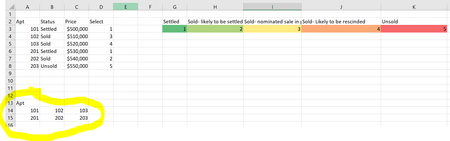
liping123 If the Apt codes column A are always sorted in ascending order, you could use a CF formulae like:
=LOOKUP(A14,$A$3:$A$8,$D$3:$D$8)=1 for dark green,
=LOOKUP(A14,$A$3:$A$8,$D$3:$D$8)=2 for light green etc.
as demonstrated in the attached file.
If you are on a recent version of Excel that supports XLOOKUP, I would recommend to use that in stead. The formula would be similar, though you'd have to adopt is slightly.

liping123 If the Apt codes column A are always sorted in ascending order, you could use a CF formulae like:
=LOOKUP(A14,$A$3:$A$8,$D$3:$D$8)=1 for dark green,
=LOOKUP(A14,$A$3:$A$8,$D$3:$D$8)=2 for light green etc.
as demonstrated in the attached file.
If you are on a recent version of Excel that supports XLOOKUP, I would recommend to use that in stead. The formula would be similar, though you'd have to adopt is slightly.
