Forum Discussion

Conditional formatting with multiple conditions not working
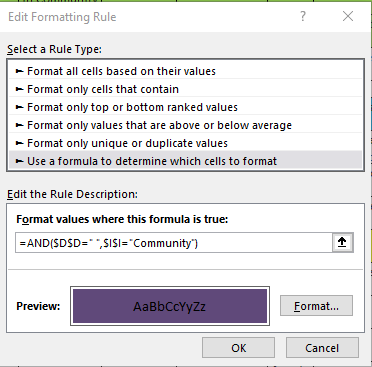

Paula2325 So I assume you are applying this format to a range in column D. You have a couple problems. 1st, to refer to an entire column you need a ":" in between so it would look like $D:$D. BUT 2nd and more important you don't want to refer to the entire column (at least I don't think that is what you are trying to do). conditional formatting looks at the upper left cell of the range you are applying it to and evaluates the formula and then moves cell to cell and adjusts the formula accordingly. What that means is you only want to write the formula as if you are ONLY interested in the upper left cell of the range.
So if your range is $D:$D (the entire column of D) then D1 is the upper left and the formula you want is:
=AND($D1="",$I1="Community")
Please NOTE that I did NOT use "$" before the row #s, because you want Excel to increment D1 to D2 to D3, etc... as it goes down the column.
Lastly, to check if the cell is blank you could use ISBLANK($D1) but the problem with that or the above ="" is that sometimes people like to "clear"/"erase" a cell by hitting <space><enter> which really doesn't make it blank but rather =" " (have a space character in it). If you want to ignore spaces and accept blank looking cells as blank, then you can use TRIM($D1)=""
 Paula2325Feb 21, 2021Copper Contributor
mtarler thanks for your solution. I had amended my formula to
=AND(ISBLANK(D2),I2="Community ") (yes there is a space after community as it's coming from a drop down selection) and tried it in a dummy column to get a true/false and it worked but when I applied it in the conditional formatting it wasn't working as expected.
On closer inspection there were so many rules already set up that I think it was interfering with the new rule (it's not my spreadsheet). So I cleared out all the rules that weren't doing anything and my conditional formatting is now working 🙂
Thanks for your help.
- SergeiBaklanFeb 21, 2021Diamond Contributor
As a comment
1) As mtarler mentioned it's always better to lock the columns in references, like =AND(ISBLANK($D2),$I2="Community ") even if you apply the rule only to the range in one column, e.g. to A2:A1000.
2) As a rule keep one conditional formatting rule for one color / format applied, avoid using different rules which return the same formatting.
