Forum Discussion

Noortje Vollenberg
Jun 06, 2019Copper Contributor
Conditional formatting with custom formula: revenue value in last three months
Hi! I've got a custom formula for conditional formatting I'd like some help with. This URL holds a copy example of my original file: https://docs.google.com/spreadsheets/d/1wp3AMnlZr0hgRBLbQlMBgH...
- Jun 12, 2019
Noortje Vollenberg , formula rule could be
=((SUMPRODUCT( (($U$1:$AF$1<EOMONTH(TODAY(),-1))*($U$1:$AF$1>EOMONTH(TODAY(),-4)))*$U2:$AF2)<350)+(SUMPRODUCT( (($U$1:$AF$1<EOMONTH(TODAY(),-1))*($U$1:$AF$1>EOMONTH(TODAY(),-4)))*($U2:$AF2<200))=3))*(U$1<EOMONTH(TODAY(),-1))*(U$1>EOMONTH(TODAY(),-4))
Please check attached

Noortje Vollenberg
Jun 12, 2019Copper Contributor
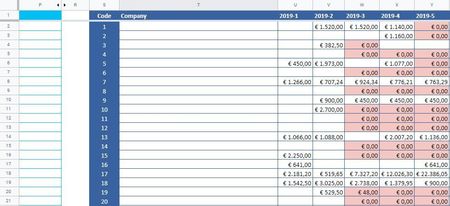
Perhaps this illustrates better what I am looking for:
It's currently June, meaning that the 3 month period I'm looking at is March to May. I need these three months to be highlighted if every one of these months'revenue is below 200, or the combined revenue is below 350 (whichever works better in a formula).
So if March=0, April=500, May=10 then this shouldn't be highlighted (the revenue in April shows this is an active customer).
But if March=10, April=120, May=30 then these three months should be highlighted (this revenue does not show an active customer as the values are too low for significant purchases).
It's currently June, meaning that the 3 month period I'm looking at is March to May. I need these three months to be highlighted if every one of these months'revenue is below 200, or the combined revenue is below 350 (whichever works better in a formula).
So if March=0, April=500, May=10 then this shouldn't be highlighted (the revenue in April shows this is an active customer).
But if March=10, April=120, May=30 then these three months should be highlighted (this revenue does not show an active customer as the values are too low for significant purchases).

SergeiBaklan
Jun 12, 2019Diamond Contributor
Noortje Vollenberg , formula rule could be
=((SUMPRODUCT( (($U$1:$AF$1<EOMONTH(TODAY(),-1))*($U$1:$AF$1>EOMONTH(TODAY(),-4)))*$U2:$AF2)<350)+(SUMPRODUCT( (($U$1:$AF$1<EOMONTH(TODAY(),-1))*($U$1:$AF$1>EOMONTH(TODAY(),-4)))*($U2:$AF2<200))=3))*(U$1<EOMONTH(TODAY(),-1))*(U$1>EOMONTH(TODAY(),-4))
Please check attached
- Noortje VollenbergJun 12, 2019Copper Contributor
Hi Sergei,
Thanks so much for your help. This is working perfectly!
I've added a second variation of the formula with AND( .... ;U2=0) to hide the text for cells with a value of 0 so the file is more legible.
- SergeiBaklanJun 13, 2019Diamond Contributor