Forum Discussion

JuttaWERU
Jan 31, 2023Copper Contributor
Conditional formatting with 3 color scale. Copy format to other cells
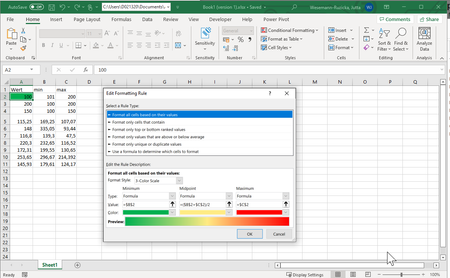
Dear experts, How can I copy the conditional formatting of the 1st row to subsequent rows taking into account the values of the corresponding row and not the 1st one. Thanks in advance for yo...
- Feb 13, 2023
Sorry, I didn't test properly. It works differently compare to couple of years ago. Workaround could be
- apply the rule to $A$2 only
- using format painter apply to other cells but A3
- in CF manager duplicate rule for A2 and apply it to A3

SergeiBaklan
Jan 31, 2023Diamond Contributor
You may use OFFSET for the gradient and icons
min:
=OFFSET($C$2, ROW()-ROW($A$1)-1, 0)
midpoint:
=(OFFSET($B$2, ROW()-ROW($A$1)-1, 0)+OFFSET($C$2, ROW()-ROW($A$1)-1, 0))/2
max:
=OFFSET($B$2, ROW()-ROW($A$1)-1, 0)

JuttaWERU
Jan 31, 2023Copper Contributor
Thanks for your proposal.
It works when downloading your excel , but not if I copy and past to my excel: => Invalid formula
- SergeiBaklanJan 31, 2023Diamond Contributor
Perhaps you shall use semicolons in formula instead of commas. Could you share your file?
- JuttaWERUFeb 01, 2023Copper ContributorYou were right, replacing the ',' by ';' did help!
But I still have the problem that also with the Offset formula min and max values are taken from B2 and C2 as absolute reference for all other values. Do you have an idea how to solve this?
Thanks,
Jutta- SergeiBaklanFeb 13, 2023Diamond Contributor
Sorry, I didn't test properly. It works differently compare to couple of years ago. Workaround could be
- apply the rule to $A$2 only
- using format painter apply to other cells but A3
- in CF manager duplicate rule for A2 and apply it to A3
- JuttaWERUJan 31, 2023Copper ContributorI looked in my private message, but it's empty.
- JuttaWERUJan 31, 2023Copper ContributorI sent a message to you with the excel.