Forum Discussion

JoeWilson5
Oct 23, 2024Copper Contributor
Conditional formatting to highlight a cell if a certain value appears in another sheet
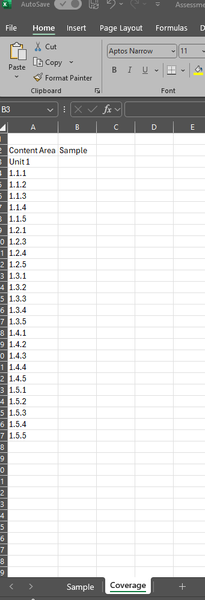
I am needing to add shading to a cell to highlight if a figure appears in another tab: For example, highlight column B, next to 1.1.1, if 1.1.1 appears in any of the cells in columns B-H on...
- Oct 24, 2024
Sheet names that contain spaces or punctuation must be enclosed in single quotes:
=COUNTIF('Paper 1'!$B:$H, A3)You can also do the following:
In B3:
=COUNTIF(INDIRECT('"&B$2&"'!$B:$H"), $A3)This can be filled or copied down and to the right.

JoeWilson5
Oct 24, 2024Copper Contributor
Thank you so much, how would I replicate for other sheets? eg the same thing for for multiple tabs and multiple columns?
I tried copying the formula and replacing 'Sample' with 'Paper 1' but it came up with an error message so assuming I did something wrong!

HansVogelaar
Oct 24, 2024MVP
Sheet names that contain spaces or punctuation must be enclosed in single quotes:
=COUNTIF('Paper 1'!$B:$H, A3)You can also do the following:
In B3:
=COUNTIF(INDIRECT('"&B$2&"'!$B:$H"), $A3)This can be filled or copied down and to the right.
- JoeWilson5Oct 24, 2024Copper Contributorthank you so much, got it all working across all of the sheets now!