Forum Discussion

Conditional formatting problem
- Nov 18, 2021
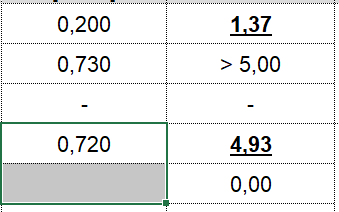
You have text in column E (">5"), not number. In Excel any text is "more" than any number, thus formula in conditional formatting rule returns FALSE for any text.
As variant you may change on formula like this
or expand it replacing "<" if any as well

Its not formatted- like you see in the screenshot. Any ideas?

- EberleinHENov 18, 2021Copper Contributor
SergeiBaklanHi Sergei,
thank you for your seloution. It still dont work in my case. Please take a look to my conditional formatting:
And here the rule for the row:
Maybe its something with the rule in the row? I dont really know, i have no idea why it dont work..
Thank you in advance!
- SergeiBaklanNov 18, 2021Diamond Contributor
You have text in column E (">5"), not number. In Excel any text is "more" than any number, thus formula in conditional formatting rule returns FALSE for any text.
As variant you may change on formula like this
or expand it replacing "<" if any as well
- EberleinHENov 18, 2021Copper ContributorSergeiBaklan worked! Thanks a lot!