Forum Discussion

Conditional Formatting Partial
- Apr 19, 2025
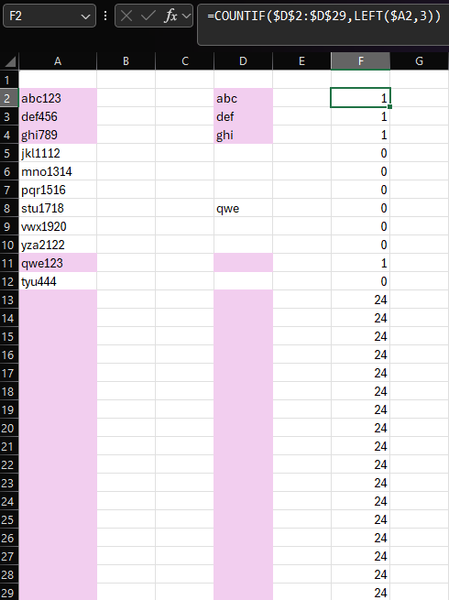
Using your example:
Select A2:A29 (or however far down you want).
A2 should be the active cell in the selection.
Create a conditional formatting rule with formula=AND(A2<>"", OR(LEFT(A2, 3)=$D$2:$D$1000))
Select D2:D29 (or however far down you want).
D2 should be the active cell in the selection.
Create a conditional formatting rule with formula=AND($D2<>"", COUNTIF($A$2:$A$1000, $D2&"*"))

Feels like thats the exact formula I was trying but wouldn’t work. Only difference I see is that I have multiple columns and rows to search from so not sure if that makes the formula change. Didn’t have a chance to try it as I had to leave work but will give it another try tomorrow.
for example, instead of
=AND(A2<>"", OR(LEFT(A2, 3)=$D$2:$D$1000), ISNUMBER(SEARCH("no", A2)))
I’m using
=AND(A2<>"", OR(LEFT(A2, 3)=$D$2:$G$1000), ISNUMBER(SEARCH("no", A2)))
so instead of just looking a column it’s an array and I think that’s what throws off the formula
Might just have to do a formula for each column

When I try that, it works correctly - at least, it appears that way to me:
What am I missing?
- FatManFluffApr 20, 2025Brass Contributor
Was super tired and was putting in wrong info got it to work 😂 Your formula was correct and works.
What would be the formula if I wanted the stuff on the right to highlight with the same colors? (Whatever is in column D:G on your example)
- HansVogelaarApr 20, 2025MVP
How do you want to color abc in D2 if there is an entry "abc123 yes ma'am" in column A but also an entry "abc456 no sir" ?