Forum Discussion

Conditional Formatting Partial
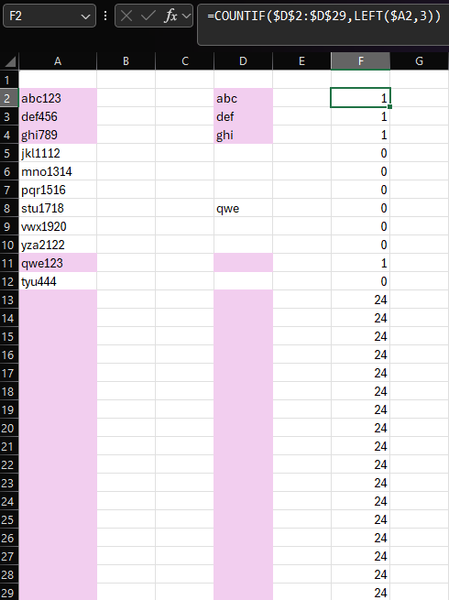
- Apr 19, 2025
Using your example:
Select A2:A29 (or however far down you want).
A2 should be the active cell in the selection.
Create a conditional formatting rule with formula=AND(A2<>"", OR(LEFT(A2, 3)=$D$2:$D$1000))
Select D2:D29 (or however far down you want).
D2 should be the active cell in the selection.
Create a conditional formatting rule with formula=AND($D2<>"", COUNTIF($A$2:$A$1000, $D2&"*"))

Using your example:
Select A2:A29 (or however far down you want).
A2 should be the active cell in the selection.
Create a conditional formatting rule with formula
=AND(A2<>"", OR(LEFT(A2, 3)=$D$2:$D$1000))
Select D2:D29 (or however far down you want).
D2 should be the active cell in the selection.
Create a conditional formatting rule with formula
=AND($D2<>"", COUNTIF($A$2:$A$1000, $D2&"*"))

HansVogelaarthank you for the very quick response that was worked like a charm! I will mark it as a solution. Once I applied it to my excel sheet I noticed another twist I would like to add I hope you can give me a hand with that. I was to be able to be a certain color if the partial match also contains a yes or no. I will screenshot again what I mean,
In this situation if it finds a partial I would also like for it to look for a "yes" or a "no". The "yes or no" is not always in the place so I was thinking maybe a ISNUMBER(SEARCH(????) not sure, but if "yes" pink if "no" then blue
- HansVogelaarApr 19, 2025MVP
For A2:A29 (or further down), use the formulas
=AND(A2<>"", OR(LEFT(A2, 3)=$D$2:$D$1000), ISNUMBER(SEARCH("yes", A2)))
and
=AND(A2<>"", OR(LEFT(A2, 3)=$D$2:$D$1000), ISNUMBER(SEARCH("no", A2)))
- FatManFluffApr 20, 2025Brass Contributor
In my current worksheet there won’t be same entry twice. My list consists of radio numbers followed by current location. I just want both sides of the match to highlight with the same color. Wish I could share my sheet just can’t due to job restrictions.
if abc123 is pink then also highlight pink the abc. I want both to go the same color
- HansVogelaarApr 20, 2025MVP
Select D2:G1000 or however far down you want.
D2 should be the active cell in the selection.
Create rules with formulas
=AND(D2<>"", COUNTIF($A$2:$A$1000, D2&"*yes*"))
and
=AND(D2<>"", COUNTIF($A$2:$A$1000, D2&"*no*"))
Please note that there is no $ before the column letter D this time.