Forum Discussion

Conditional Formatting on one cell based on a range satisfying a criteria
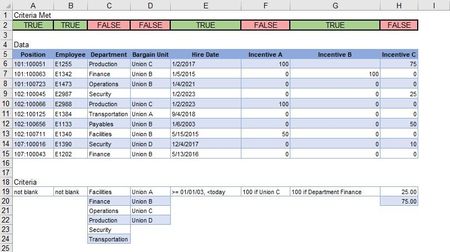

cjacobsen633 It seem you already have formulas in place on row 2 that return either TRUE or FALSE. Then the following rules will do the colouring for you.
(Picture taken on a Mac, but it's similar for the PC version of Excel)
 cjacobsen633Apr 27, 2023Copper Contributor
Riny_van_Eekelen Thank you for the response. I am sorry, I was not very clear in my ask. I am having problems writing the formulas to make the CF work. This picture is my desired outcome. I can write the formulas to use CF on each row of the data, but I don't know how to write the formulas to review the column first, then summarize and apply the CF to the end result.
- Riny_van_EekelenApr 27, 2023Platinum Contributor
cjacobsen633 Then start by explaining the logic for every TRUE or FALSE. For columns A and B it seems obvious. None of the cells are blank, thus TRUE. I don't really understand how to interpret the criteria for C and D and why these become FALSE. Column E seems obvious but why is column F FALSE when there is a value 100 for Union C? G is clear but H is not. At least, not to me.