Forum Discussion

Conditional Formatting Issue
- Dec 30, 2024
Select C3:C997 or however far down you need.
C3 should be the active cell in the selection.
On the Home tab of the ribbon, click Conditional Formatting > New Rule...
Select 'Use a formula to determine which cells to format'.
Enter the formula=AND(COUNTIF($A$3:$A$997, $A3)>1, COUNTIFS($A$3:$A$997, $A3, $C$3:$C$997, $C3)=1)
Adjust the ranges as needed.
Click Format...
Activate the Fill tab.
Select a fill color.
Click OK, then click OK again.

Select C3:C997 or however far down you need.
C3 should be the active cell in the selection.
On the Home tab of the ribbon, click Conditional Formatting > New Rule...
Select 'Use a formula to determine which cells to format'.
Enter the formula
=AND(COUNTIF($A$3:$A$997, $A3)>1, COUNTIFS($A$3:$A$997, $A3, $C$3:$C$997, $C3)=1)
Adjust the ranges as needed.
Click Format...
Activate the Fill tab.
Select a fill color.
Click OK, then click OK again.

Hello,
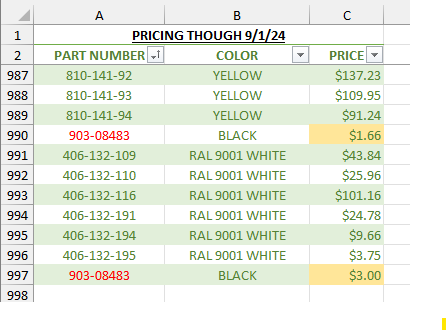
I entered your formula but I'm not really understanding what this is doing... I entered my value into A997 and it formatted C990. Then, I entered my value for C997, and it formatted C996. I also tried both "$4.00" and "$3.75" as my value for C997 and it formatted C996 no matter what, even when the prices matched.
In the example below, C991 is what should have ultimately been formatted....
- HansVogelaarJan 02, 2025MVP
Could you attach a small sample workbook demonstrating the problem (without sensitive data), or if that is not possible, make it available through OneDrive, Google Drive, Dropbox or similar?
- jconverseJan 03, 2025Copper Contributor
I have attached a small sample of the workbook I'm working on. When you open it, you will see A3 and A14 both formatted to turn red since they are duplicates. What I am looking for, is once I had entered the price into C14, it would have checked to see if C3 is a match and if it is NOT a match, to format with whatever color to catch my attention that there is a pricing discrepancy that I need to look into further.
- peiyezhuJan 03, 2025Bronze Contributor
//select * from Sheet2;
cli_mark_duplicate_rows~Sheet2~`PART Number`;
https://answers.microsoft.com/en-us/msoffice/forum/all/how-to-alternate-highlighting-of-groups-of-rows/c95b66f4-7151-41ec-b7ee-e16247cf40a7