Forum Discussion

Conditional Formatting Help! Multiple Conditions across multiple worksheets
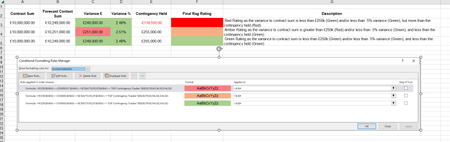

Thanks for the feedback and advice mathetes. Unfortunately I'm unable to provide a copy of the actual, document due to commercial reasons and GDPR around what it contains.
I shall keep trying to resolve through trial and error and hopefully sombody who specialises in conditional formatting, can write out the formula as necessary to produce the outcomes as described and I can copy and change the cells referenced.

It's not necessary to provide your actual file, sample one with information which is already on screenshot plus fake data from another sheet, if it used in the rule and only such one, is enough.
On screenshot it looks like you try to highlight range C2:D4, however the rule is applied only to one cell $J$4. Formula in rule iterates nothing since it uses absolute references for $H$42 and $C$42. Why?
Other words it's not clear which logic connects C2:D4, $J$4, $H$42 and $C$42.