Forum Discussion

Conditional formatting formula not recognizing equals
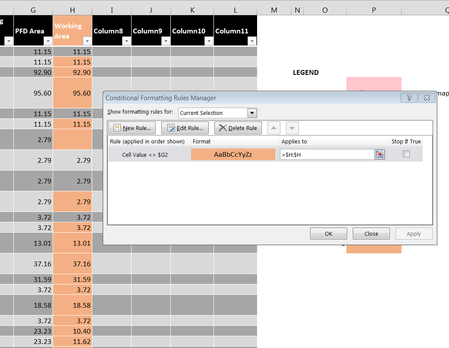


I actually adjusted the workbook to put the rounding function on the data source instead of the lookup function. Still no luck.
BUT! I changed the the condition to formula and set it as =C$1=D$1 and voila. Perfect.
Why the prefab comparison doesn't work is beyond me...
- JKPieterseNov 02, 2017Silver ContributorWhat is important is to write the formula with in mind that you are in fact editing the formula for the top-left-most cell of the range which contains the CF rule. And that you must pay attention to using absolute and relative references in the right way.
- SergeiBaklanNov 02, 2017Diamond Contributor
Are you sure?
Initially you'd like to compare values in columns G and H row by row. With that rule you check if the value in next column is equal to the value in previous one, but only in row #1.
- W DNov 03, 2017Copper Contributor
Sorry, my error in swapping "=" for "<>".
The final Rule that worked is as follows:
Formula: =$I1<>$J1 applied to: =$j:$j.
Simple enough, just not the first thing I tried.
Still not certain as to why
"Format only cells with Cell Value not equal to..." doesn't work.
Perhaps THAT is the question I should've asked.
- SergeiBaklanNov 03, 2017Diamond Contributor
Hi,
In general it shall work as well:

