Forum Discussion

Conditional formatting for highlighting the dates as per the milestones
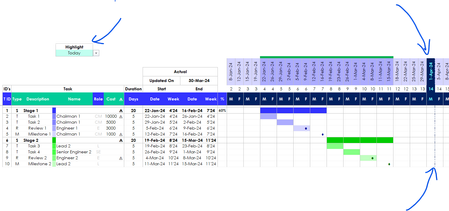

HansVogelaar Thanks for your response. Pls refer the link for the sample file.
https://docs.google.com/spreadsheets/d/1cLCzsSGpeX26KjqyJiDAYlRhB9zqI1OY/edit?usp=drive_link&ouid=108877107317939531893&rtpof=true&sd=true.
As explained, I would like to highlight the end date of the milestones in the timeline when we select "Milestones" in the Highlight dropdown list. Looking forward for your comments.

That workbook doesn't work because it depends on links to another workbook.
- SreebalajinarayananMar 31, 2024Copper Contributor
Sorry for the inconvenience. Pls refer this sheet.
https://docs.google.com/spreadsheets/d/1fIWmFEJ8HrMlmdbbSGkhYc9EqTlxQR_f/edit?usp=drive_link&ouid=108877107317939531893&rtpof=true&sd=true- HansVogelaarMar 31, 2024MVP
I'm sorry, but I cannot help you. The workbook relies on a large number of interrelated defined names. It's difficult to find out how they work, especially since many of them are not valid in your copy of the workbook - many of the defined names refer to #REF! i.e. to a non-existent range.
But even if they were valid, it would be complicated.