Forum Discussion

Miranda Hill
Sep 29, 2018Copper Contributor
Conditional Formatting for Blank Cell Based of Another Cell's Date
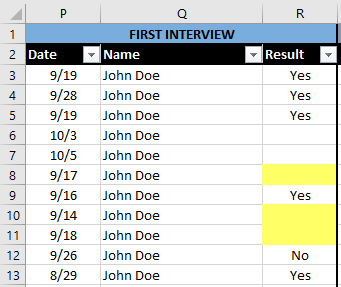
I'm trying to use conditional formatting to highlight the a blank cell if the date in another is in the past AND the corresponding cell is blank.
I've manually highlighted the cells in the attached photo to illustrate what I'd like it to do. Highlight blank cells in R if the date in P is in the past based on today's date.
Is this possible? Thank you in advance for any ideas!
1 Reply
 BobOrrellIron Contributor
Highlight the cells you want to format, click conditional formatting, new rule, use a formula, =AND(NOT($P2=""),$P2<TODAY(),R2="") (assuming you are starting on row 2, otherwise change the 2's in the formula to the first row of your selection).