Forum Discussion

Conditional formatting duplicates doesn't highlight them
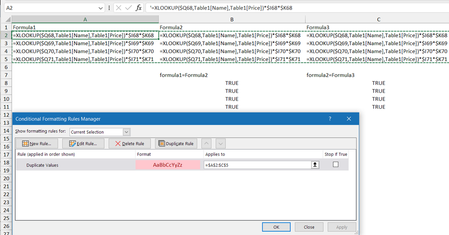

Very interesting case. It appears Excel reads the '*' as a wildcard in this context. It seems to do the same for '?' as well. Initially, I thought it was something with the functions so that's why you see some made up functions in the cap below.

Patrick2788 Nice find. I wonder though, since both formulas in A2 and B2 are identical, the presence of wild-chard characters shouldn't make a difference; they are still duplicates. Looks like their algorithm doesn't escape wild-card characters?
Anyways, I tried some more combinations and here it gets interesting. I have this:
Next, I do a search and replace on row 4, removing the = signs. This is what happens:
Huh????
- Patrick2788Feb 06, 2024Silver Contributor
It's interesting that this quirk doesn't seem to be documented in any support article nor in the more in depth articles at https://learn.microsoft.com/. I even dug through some old Excel user guides in the wayback machine with no luck. For grins I ran it by co-pilot and it merely confirmed * and ? are treated as wildcards. Co-pilot tends to be all over the place in Excel (it's not yet aware of newer functions like TAKE, DROP, WRAPROWS, etc.) but can be OK on facts (Oddly, it is aware of thunks.).
- JKPieterseFeb 07, 2024Silver Contributor
Yes it is odd indeed. IMO the fact it seems to interpret them as wildcard characters is a bug leading to unexpected behavior potentially giving both false positives and false negatives. People rely on the highlight duplicates feature to do precisely that: highlight the duplicates.
That was what I was trying to do with these formulas (placed in the cell as text): spot which were different!