Forum Discussion

Conditional formatting doubt
- Jan 28, 2026
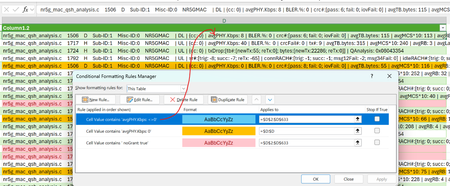
That rule is looking for "avgPHY.Kbps: <>0" and in no case would it find "<>0" so it is never true.
You modify it to be 'Cell Value does NOT contain' 'avgPHY.Kbps: 0'
but then lines that don't have 'avgPHY.Kbps:' at all would also be highlighted.
you could create multiple rules with a first rule like the one above but without the '0' so if Cell Value does NOT contain 'avgPHY.Kbps:' then do nothing and 'Stop if True' and then the rule above to highlight if it 'fails' the first test but 'passes' the second.
alternatively you can create a rule using a custom formula (the last line/option in the above image):
=isnumber(search("avgPHY.Kbps:",D2))*not(isnumber(search("avgPHY.Kbps: 0", D2)))


Thanks m_tarler for your Support!!
Attaching the worksheet, after applying the formula you shared , seems it's not fully working see the prints highlighted, which shouldn't be there and there are rows with avgPHY.Kbps:<>0, but still not highlighted as below:-