Forum Discussion

Anna-ChrystieL
Sep 03, 2024Copper Contributor
Conditional Formatting based on the date of another column
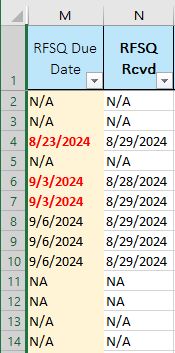
Hello! Not sure if this is possible.. I have a rule that changes the due date (column M) text to bold red text if it is passed today's date (see rule below, Cell Value <=TODAY()), this rule works...

Lorenzo
Sep 03, 2024Silver Contributor
If this reflects what you meant:
2nd CF Rule with Formula:
=ISNUMBER($N2)
Corresponding sample attached + I would highly recommend you format your data as Table to avoid applying CF rules to whole columns (> 1M rows). When you add new rows(s) at the bottom of an existing Table, the corresponding Applies to range is auto. adjusted by Excel 🙂 - Try it in the attached file