Forum Discussion

spr1nger
Jun 08, 2022Copper Contributor
Conditional Formatting based on referenced cell with a date
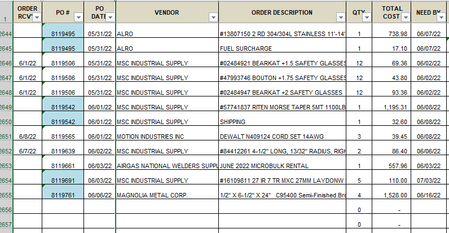
I have a spreadsheet to track orders placed and the PO's for each order. I want to highlight column B if the order hasn't been Rcv'd yet, so I created a conditional format formula of =IF($A$2:$A$40...

HansVogelaar
Jun 08, 2022MVP
The formula for the conditional formatting rule should be
=$A2=""
and it should apply to C2:C4000 (for example).
- spr1ngerJun 08, 2022Copper Contributor
Thank you. But that will give me formatting for the cell if it is empty. What would be the formula to format the cell a different color (or no color) when I enter a date or txt into the cell?
- HansVogelaarJun 08, 2022MVP
The easiest way is to set the fill color of the cells directly. That color will be used when the conditional formatting rule is not applied, i.e. if column A is not empty.
- spr1ngerJun 09, 2022Copper ContributorYep, that worked!! I was making it more complicated than needed, lol. You're a genius. Thanks!
