Forum Discussion

Conditional Formatting Based on Other Formulas
- Sep 19, 2023
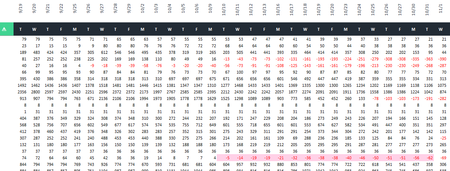
Thanks. The definition of date_row should be
=Sheet1!$D$1:$AW$1
instead of
=Sheet1!$D$1:$AW$2
I have sent the file with this modification back by PM.

Try a rule with formula
=COUNTIFS(date_row,"<="&WORKDAY(TODAY(),lead time),data_row,"<0")
where date_row is the row with dates at the top (absolute reference), and data_row is the first row with numbers (relative reference).

I can get the formula to work if I use only one criteria and delete the other. When I put them together I get #VALUE. Thank you for the help.
- HansVogelaarSep 19, 2023MVP
Could you attach a small sample workbook demonstrating the problem (without sensitive data), or if that is not possible, make it available through OneDrive, Google Drive, Dropbox or similar?
- damainprizeSep 19, 2023Copper Contributor
The file type (.xlsx) is not supported. I'm having issues doing that.
I think I found the problem I just don't know how to fix it. With the first criteria it is just referencing the top date row and the second one it is referencing whatever data row I'm on. That is why they work separately and not together because they never have an "intersecting" cell.
- HansVogelaarSep 19, 2023MVP
You can attach the file to a private message to me (click on my user picture), or send it to
hans dot vogelaar at gmail dot com